
The Industry-Leading Database Optimization Plugin for WordPress.
Advanced Database Cleaner Coupon – 2026
Deep Clean Your WordPress Database & Reclaim Your Site’s Speed.
The Industry-Leading Database Optimization Plugin for WordPress.
Advanced Database Cleaner Coupon – 2026
Deep Clean Your WordPress Database & Reclaim Your Site’s Speed.
Exclusive Discount
Only for WPdiscounts.io visitors.
Limited Time Offer
Claim this offer before it ends.
Offer Expired - Check back soon!
Table of Content
About
Founder: Younes Jaafar
Website: SigmaPlugin.Com

What is Advanced Database Cleaner?
View Advanced Database Cleaner Coupons, Discounts, Promo Codes, and Pricing Plans below.
Not every WordPress site stays optimised forever. Over time, your database accumulates a massive amount of “digital junk” such as thousands of old post revisions, auto-drafts, spam comments, and expired transients. Even worse, when you uninstall a plugin or theme, they often leave behind “orphaned” tables and hidden settings that continue to bloat your database and slow down your server. The Advanced Database Cleaner plugin is the industry-leading solution designed to perform a deep-clean, helping store owners and bloggers reclaim their site’s speed and performance.
With more than 100,000 active users, this plugin provides a level of cleaning that basic tools miss. It allows you to scan your entire database to identify exactly which tables and options belong to which plugin. The Pro version introduces advanced “Remote Scan” technology, using a cloud-backed database to accurately detect orphaned items left by deleted software. This ensures you can safely delete the leftovers without accidentally breaking your site.
For high-traffic WooCommerce stores, large-scale blogs, or developers managing dozens of client sites, this tool is indispensable. It doesn’t just delete data; it optimises and repairs corrupted tables, schedules automatic maintenance, and provides detailed analytics on your database growth. By keeping your database lean, you ensure faster page loads, smaller backup files, and a more stable environment for your visitors.
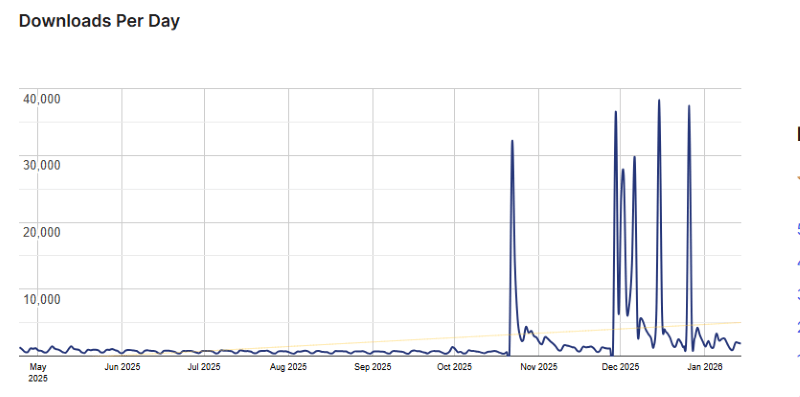
Advanced Database Cleaner Usage Statistics
Key Features of Advanced Database Cleaner
Here are some key features of Advanced Database Cleaner you should know:
- General Cleanup: Bulk delete post revisions, auto-drafts, trashed posts, spam comments, and expired transients to instantly reduce database size.
- Remote Scan Technology: Uses a cloud-based database to identify exactly which tables and options belong to which plugins, ensuring safe and accurate cleaning.
- Orphaned Tables Cleanup: Detects and removes database tables left behind by uninstalled plugins and themes that no longer serve a purpose.
- Orphaned Options Cleanup: Scans the wp_options table to find and delete settings from old plugins that are still being loaded by WordPress.
- Orphaned Cron Jobs & Metadata: Cleans up leftover scheduled tasks (cron jobs), post meta, user meta, and term meta that are no longer linked to active content.
- Database Table Optimisation: Repair and optimise all database tables with one click to improve efficiency and speed.
- Automated Scheduling: Set specific cleanup tasks to run automatically on an hourly, daily, weekly, or monthly basis.
- Autoload Management: View and manage “autoloaded” options that slow down every page load, with the ability to toggle them off easily.
- Database Growth Analytics: Provides visual charts and statistics to track your database size and row count over time.
- Advanced Filtering & Sorting: Filter items by name, size, or creator, and use the “Value Viewer” to see the content of a row before you delete it.
- Safety Features: Options to “keep the last X days” of data (like revisions or logs) to ensure you don’t delete recent important information.
- Multisite Support: Clean and optimise an entire WordPress multisite network from a single centralised dashboard.
Advanced Database Cleaner Coupons, Discounts, and Pricing Plan
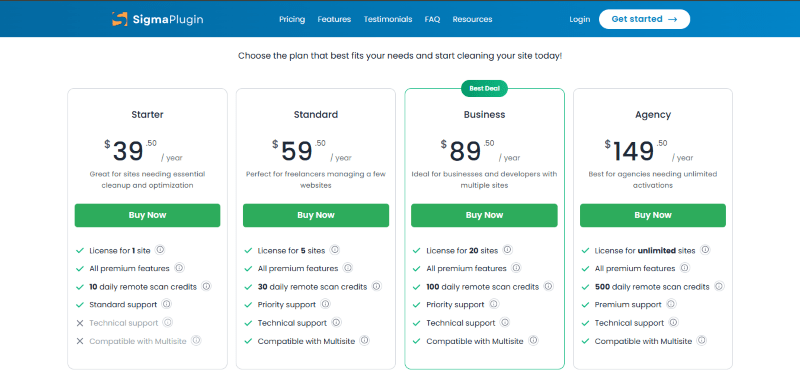
Advanced Database Cleaner has a very straightforward pricing plan.
| Starter | Standard | Business | Agency |
| $39.50 Year | $59.50 Year | $89.50 Year | $149.50 Year |
| 30-Day Money-Back Guarantee | 30-Day Money-Back Guarantee | 30-Day Money-Back Guarantee | 30-Day Money-Back Guarantee |
Advanced Database Cleaner Discounts
There is no discounts available for Advanced Database Cleaner.
Advanced Database Cleaner Lifetime Deals
There are no lifetime deals available for Advanced Database Cleaner.
How To Avail The Advanced Database Cleaner Coupon?
Step 1: Go to the pricing page and select the plan you want to buy.
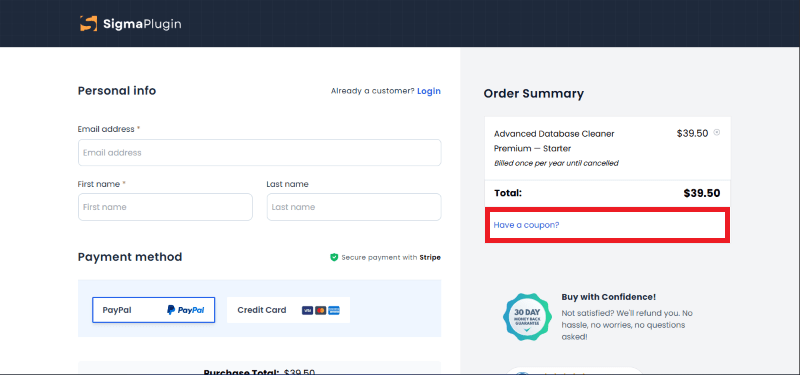
Step 2: On the Advanced Database Cleaner checkout page, click on “Have a Promotional code”
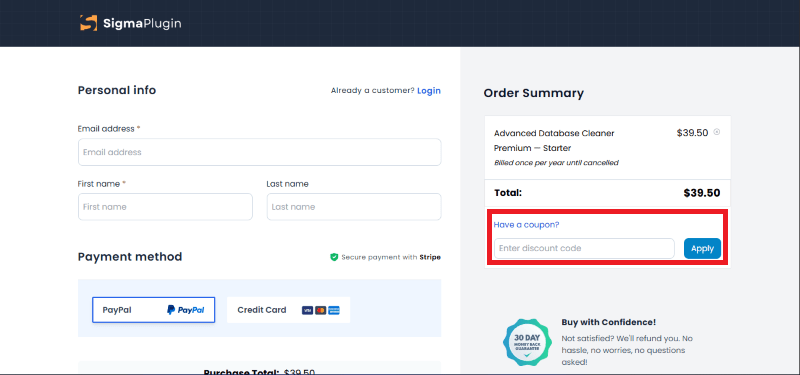
Step 3: Add the discount code in the field and click “Apply” to get the discount.
How To Install The Advanced Database Cleaner Plugin on WordPress?
Step 1: Visit the SigmaPlugin website, purchase your license, and download the Pro ZIP file.
Step 2: Log in to your WordPress dashboard.
Step 3: Navigate to Plugins > Add New.
Step 4: Click on Upload Plugin and select the Advanced Database Cleaner ZIP file.
Step 5: Click Install Now.
Step 6: After installation, go to your plugins list and click Activate.
Step 7: Enter your license key in the plugin settings to unlock all Pro features.
For Whom Is This Product Built?
This product is built for:
- Website Owners
- Agencies
- Web Designers
- E-commerce Store Owners (WooCommerce)
- Developers
- Freelancers
- Bloggers with large post histories
- IT Managers
Advanced Database Cleaner Alternatives
Here are some alternatives to the Advanced Database Cleaner plugin.
- WP-Optimize
- WP-Sweep
- Database Cleaner
| Product Name | WP-Optimize By David Anderson / Team Updraft | WP-SweepBy Lester Chan | Database CleanerBy Jordy Meow |
| Number of Websites | 1+ million | 100,000+ | 10,000+ |
What Advanced Database Cleaner Customers Say
“Run an MSP with 100+ WordPress sites under management. This plugin is part of my standard maintenance toolkit.
The v4 update is a big improvement way cleaner interface, and the orphan detection actually works properly. Premium is worth it if you’re dealing with sites that have had dozens of plugins installed/removed over the years. Saves me from manually digging through wp_options trying to figure out what leftover garbage belongs to what.
Scheduling works reliably, previews show you exactly what’s getting nuked before you commit. That matters when it’s a client’s production site.
Does what it says, actively maintained, recommended.”
“I love this plugin, I don’t manage it, it’s just there managing my WordPress, clearing those transients every night without a hassle. I recommend everyone to use it.”
Read more reviews on WordPress.org.
We’d love to hear your thoughts and opinions on Advanced Database Cleaner. Share your experiences and insights in the comments below.
Advanced Database Cleaner
You Might Also Like

CLDY Web Hosting Coupon – 2026

IvyForms Coupon – 2026

Jetpack Stats Coupon – 2026
From the WPdiscounts Blog
 The way we do business has changed forever, and many business interactions have moved online. In 2026, a massive 70% of professionals are working in…
March 3, 2026
 Donorbox is popular because it is quick to set up and offers hosted donation pages, embeddable donation forms, and support for recurring donations. For many…
February 27, 2026
 In 2026, the digital landscape in Southeast Asia is more competitive than ever. For businesses operating in and around Singapore, a "fast" website is no…
February 26, 2026