
Simplified Ad Management For WordPress.
AdSanity Coupon – 2026
Turn Your Site Traffic into Real Revenue.
Simplified Ad Management For WordPress.
AdSanity Coupon – 2026
Turn Your Site Traffic into Real Revenue.
Exclusive Discount
Only for WPdiscounts.io visitors.
Limited Time Offer
Claim this offer before it ends.
Offer Expired - Check back soon!

What is AdSanity?
View AdSanity Coupon, Discounts, Promo Codes, & Pricing Plans below.
Trying to manage ads in WordPress usually feels like a total headache. You’re either stuck with a plugin that’s way too complicated or one that slows your site down to a crawl. AdSanity was built by the guys over at Pixel Jar to fix exactly that. It’s a premium tool that turns your site into its own little ad server, but without the technical nightmare that usually comes with it.
When you’re selling your own banner space directly to local sponsors or just trying to get Google AdSense to look right, AdSanity keeps things simple. Their whole vibe is “light and fast.” Instead of cramming every single bell and whistle into the main plugin, they keep the core version lean so your site stays snappy. If you eventually decide you need the heavy-duty stuff like ad-block detection or deep Google Analytics tracking, you just toggle on an Add-On, and you’re good to go.
It’s a lifesaver for anyone who needs to manage a handful of ads but doesn’t want to spend their whole day in a settings menu. It gives you back that professional control over your site’s revenue without making the experience miserable for your readers.
Key Features of AdSanity
Here are some key features of AdSanity you should know:
- Easy Ad Management: Create and manage ads just like you would a WordPress post. It’s familiar and requires zero learning curve.
- Flexible Publishing: You can set ads to run indefinitely or schedule them for specific dates (perfect for limited-time sponsorships).
- Placement Freedom: Use Widgets, Shortcodes, or Template Tags to put ads exactly where you want them sidebar, header, or right in the middle of your content.
- HTML5 & Video Support: It’s not just for static images. You can run modern HTML5 ads and video advertisements seamlessly.
- Dashboard Analytics: Get clear, visual reports on how many people are seeing and clicking your ads without ever leaving your WordPress admin area.
- Developer Friendly: It’s packed with hooks and filters, making it a dream for developers who need to customise ad behaviour for specific clients.
AdSanity Coupons, Discounts, and Pricing Plan
AdSanity has a very straightforward pricing plan.
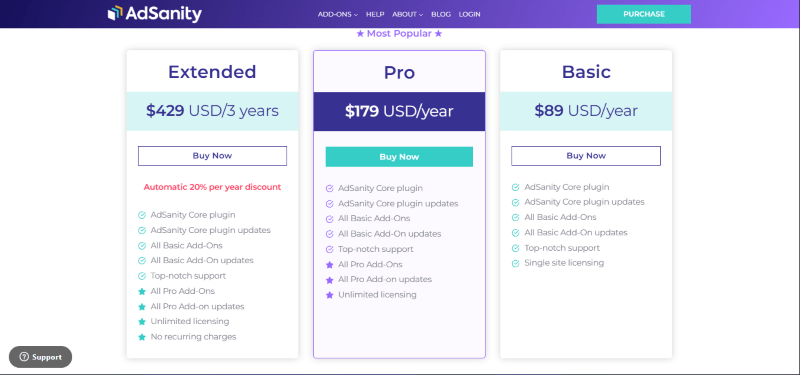
| Basic | Pro | Extended |
| $89 USD/ Yearly | $179 USD/ Yearly | $429 USD/ 3 Yearly |
| 14-Day Money-Back Guarantee | 14-Day Money-Back Guarantee | 14-Day Money-Back Guarantee |
AdSanity Discounts
There are no discounts available for AdSanity.
AdSanity Lifetime Deals
There are no lifetime deals available for AdSanity.
How To Avail The AdSanity Coupon?
Step 1: Go to the pricing page and select the plan you want to buy.
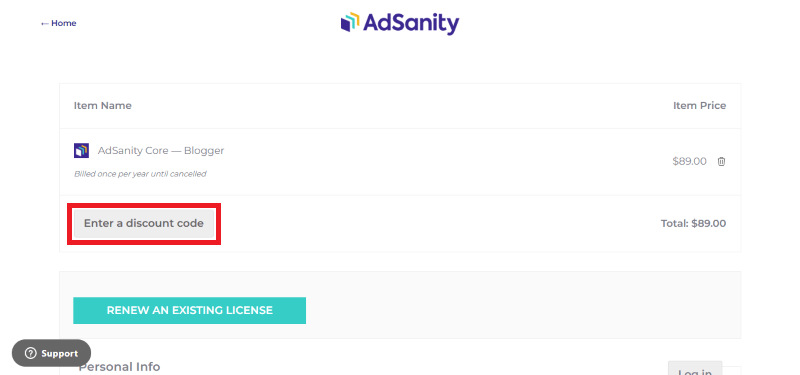
Step 2: On the AdSanity checkout page, click on “Enter Discount code”
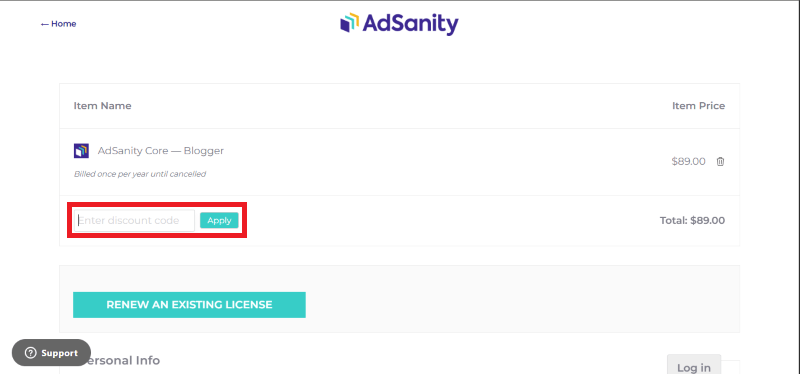
Step 3: Add the discount code in the field and click “Apply” to get the discount.
How To Install The AdSanity Plugin on WordPress?
Step 1: First, you’ll need to download the plugin from the official website. After you purchase a license, log in to your AdSanity account and head to the downloads area. Save the ZIP file to your computer, don’t unzip it!
Step 2: Access Your Dashboard Log in to your WordPress admin area. This is usually found at yourdomain.com/wp-admin.
Step 3: On the left-side menu, hover over Plugins and click on Add New.
Step 4: At the top of the page, click the Upload Plugin button. Click Choose File, find that AdSanity ZIP file you just downloaded, and select it.
Step 5: Click the Install Now button. WordPress will take a few seconds to upload and unpack the files for you.
Step 6: Once it’s finished, you’ll see a success message. Click the blue Activate Plugin button. You will now see an “AdSanity” tab in your main WordPress menu.
Step 7: To make sure you get updates and can use the pro features, go to AdSanity > Settings and click the Licenses tab. Paste in your license key (from your email or account page), click Save, and then Activate License.
For Whom Is This Product Built?
This product is built for:
- Website Owners
- Agencies
- Web Designers
- Small Businesses
- Developers
- E-commerce Stores
- Content Creators
AdSanity Alternatives
Here are some alternatives to the AdSanity plugin.
- Ad Inserter
- WP QUADS
- AdRotate
| Product Name | Ad Inserter By Spacetime | WP QUADS By WPQuads | AdRotate By Arnan de Gans |
| Number of Websites | 300,000+ | 20,000+ | 20,000+ |
AdSanity
You Might Also Like

CLDY Web Hosting Coupon – 2026

IvyForms Coupon – 2026

Jetpack Stats Coupon – 2026
From the WPdiscounts Blog
 The way we do business has changed forever, and many business interactions have moved online. In 2026, a massive 70% of professionals are working in…
March 3, 2026
 Donorbox is popular because it is quick to set up and offers hosted donation pages, embeddable donation forms, and support for recurring donations. For many…
February 27, 2026
 In 2026, the digital landscape in Southeast Asia is more competitive than ever. For businesses operating in and around Singapore, a "fast" website is no…
February 26, 2026