Find & Fix WordPress Accessibility Issues
Accessibility Checker Coupon – 2026
Accessibility Checker is a WordPress plugin built by Equalize Digital to help website owners find and fix accessibility issues directly inside WordPress.
Find & Fix WordPress Accessibility Issues
Accessibility Checker Coupon – 2026
Accessibility Checker is a WordPress plugin built by Equalize Digital to help website owners find and fix accessibility issues directly inside WordPress.
Exclusive Discount
Only for WPdiscounts.io visitors.
Limited Time Offer
Claim this offer before it ends.
Offer Expired - Check back soon!
Table of Content
About
Founder: Amber Hinds.
Website: equalizedigital.com
Community: Community

What is Accessibility Checker?
View Accessibility Checker Coupons, Discounts, Promo Codes, & Pricing Plans below.
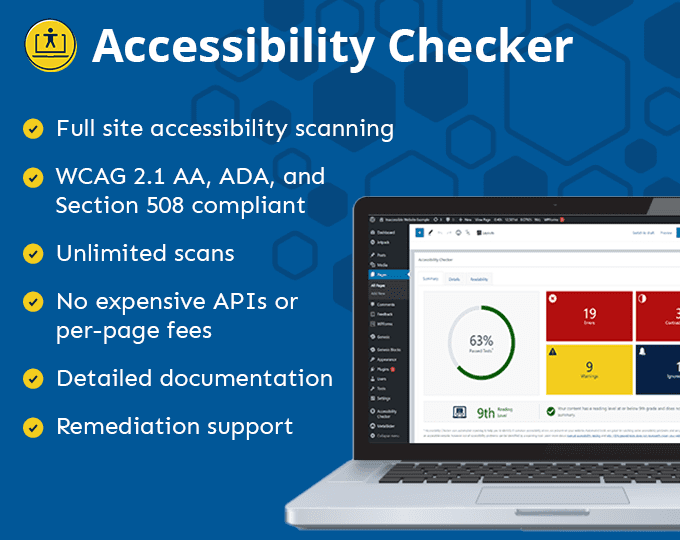
Accessibility Checker is a WordPress plugin built by Equalize Digital to help website owners find and fix accessibility issues directly inside WordPress. Instead of guessing whether your site meets accessibility standards, this tool scans your content and clearly points out what is wrong and why it matters. It focuses heavily on WCAG guidelines, which are the global standards used to judge whether a website is accessible for people with disabilities.
The plugin works right inside the WordPress editor, which makes it practical for everyday use. As you write or update content, Accessibility Checker highlights problems like missing alt text, poor color contrast, heading structure errors, or links that are confusing for screen readers. You do not need legal knowledge or advanced coding skills to understand the results. Everything is explained in plain language.
Accessibility Checker is especially helpful for businesses that want to avoid accessibility complaints while also improving user experience. An accessible website is easier to navigate, clearer to read, and more welcoming to all visitors. That often leads to longer visits, lower bounce rates, and better search visibility.
Instead of treating accessibility as a one-time task, Accessibility Checker encourages you to make it part of your regular publishing workflow. You catch problems early, fix them faster, and build a site that works better for everyone.
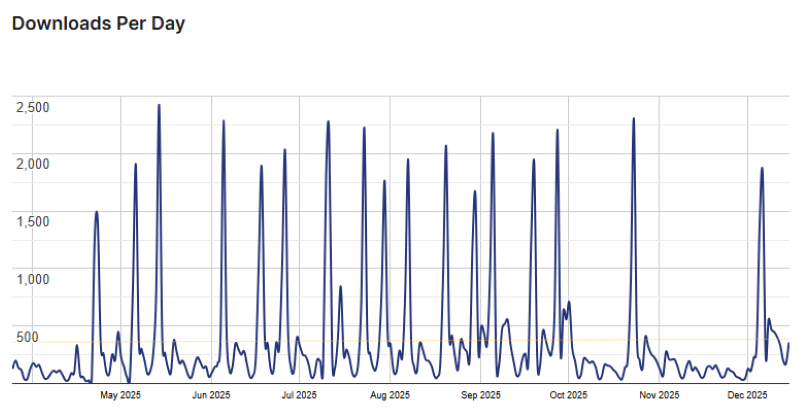
Accessibility Checker Usage Statistics
Key Features of Accessibility Checker
Here are some key features of Accessibility Checker you should know:
- Real-time Content Scanning: Accessibility Checker reviews your pages and posts as you work on them. It flags accessibility issues immediately, so you do not have to wait until publishing to discover problems.
- WCAG-Based Issue Detection: The plugin checks content against WCAG 2.1 guidelines, including common errors that affect screen readers, keyboard navigation, and visual clarity.
- Clear Error Explanations: Each issue comes with a short explanation and guidance on how to fix it. This helps non-technical users understand what needs to be done without feeling overwhelmed.
- Site-wide Scanning on Higher Plans: Advanced plans allow you to scan your entire website and generate reports that show overall accessibility progress and problem areas.
- Developer Friendly Hooks and Filters: For teams and agencies, Accessibility Checker offers flexibility to customize rules and workflows, making it suitable for professional environments.
Accessibility Checker Coupons, Discounts, and Pricing Plan
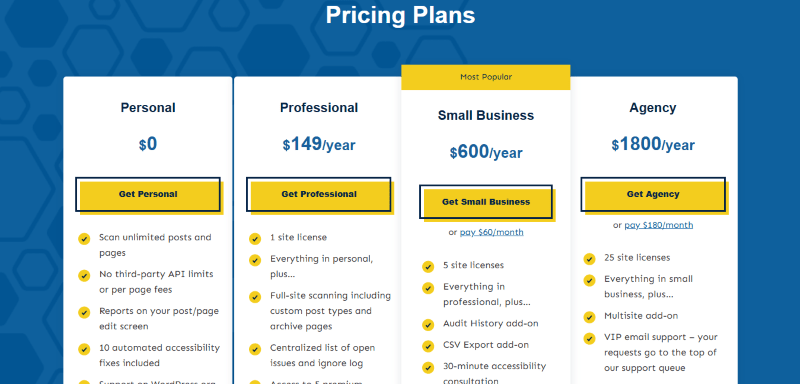
Accessibility Checker has a very straightforward pricing plan.
| Free | Professional | Small Business | Agency |
| $0 | $149/yr | $600/yr | $1800/yr |
| Scan unlimited posts and pages No third-party API limits or per page fees Reports on your post/page edit screen 10 automated accessibility fixes included Support on WordPress.org support forums |
1 site license Everything in personal, plus… Full-site scanning including custom post types and archive pages Centralized list of open issues and ignore log Access to 5 premium automated accessibility fixes Priority email support |
5 site licenses Everything in professional, plus… Audit History add-on CSV Export add-on 30-minute accessibility consultation 2 accessibility office hours calls each month to answer your remediation questions |
25 site licenses Everything in small business, plus… Multisite add-on VIP email support – your requests go to the top of our support queue Preferred status in our Agency Partner Program |
Accessibility Checker Discounts
There is no discount available on the Accessibility Checker pricing plan.
Accessibility Checker Lifetime Deals
There are no lifetime deals available for Accessibility Checker.
How To Avail The Accessibility Checker Coupon?
Step 1: Go to the pricing page and select the plan you want to buy.
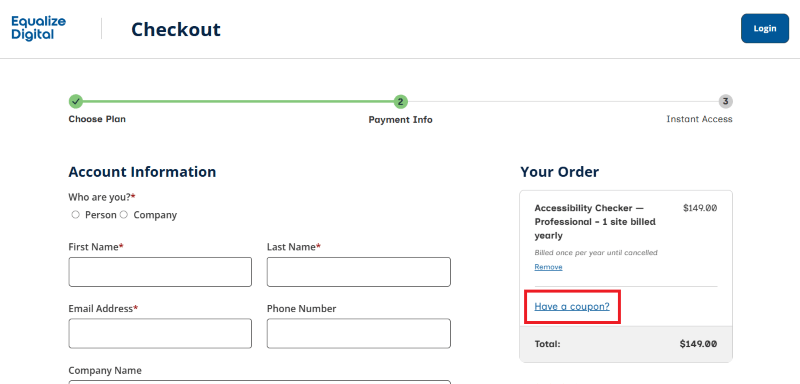
Step 2: On the Accessibility Checker checkout page, click on “Have a discount code”
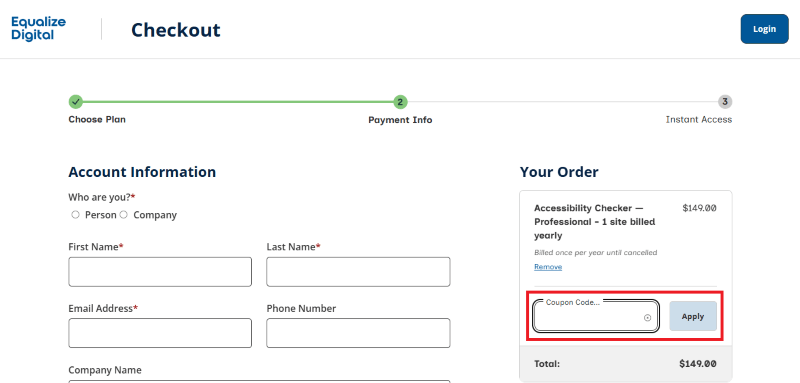
Step 3: Add the discount code in the field and click “Apply” to get the discount.
How To Install The Accessibility Checker Plugin on WordPress?
Step 1: Visit the Accessibility Checker website, choose the Pro or Free version, and download the plugin. You may receive the plugin as a zip file in your email or elsewhere.
Step 2: Log in to your WordPress dashboard
Step 3: Navigate to Plugins > Add New
Step 4: Click on Upload Plugin and select the Accessibility Checker ZIP file you downloaded.
Step 5: Click Install Now.
Step 6: After installation, go to Plugins > Installed Plugins and activate Accessibility Checker.
Step 7: Follow the prompts to configure Accessibility Checker’s initial settings after activation. The plugin is now configured to be utilized.
For Whom This Product Is Built For?
This product is built for:
- Website Owners
- Agencies
- Web Designers
- Small Businesses
- Developers
- Freelancer
- E-commerce
- Content Creators
- Marketing Professionals
Accessibility Checker Alternatives
Here are some alternatives to the Accessibility Checker plugin.
- Ally
- WP Accessibility
- WP Accessibility Helper (WAH)
- Enable Accessibility
- Web Accessibility By accessiBe
- WP ADA Compliance
- One-Click Accessibility
- WP Accessible
| Product Name | Accessibility Suite by Equalize Digital | WP Accessibility | WP Accessibility Helper (WAH) |
| Number of Websites | 9,000+ | 50,000+ | 10,000+ |
What Accessibility Checker Customers Say
“One of the things I love about this plugin is that it doesn’t fix things for me. It shows me what needs to be fixed, and directs me to information on how to do that. Learning about web accessibility to make me a better web citizen is paramount to being able to create accessible sites for all.”
“Great plugin – yes it has a few bits that can be annoying, but you can ignore things it’s bringing up if they’re not actually a problem (like “missing video transcript”, when the transcript is just below the video) – however it brings everything you need to your attention to either fix or ignore (if it’s not actually a problem)”
Read more Accessibility Checker reviews on wordpress.org
We’d love to hear your thoughts and opinions on Accessibility Checker. Share your experiences and insights in the comments below.
Accessibility Checker
You Might Also Like

Verpex Coupon – 2026

Amazon Associates WordPress Plugin Coupon – 2026

Canva Coupon – 2026
From the WPdiscounts Blog
 Most people spend way too much time picking a WordPress theme when starting a blog. It’s easy to get pulled in by designs that look…
March 30, 2026
- The best directory plugins for WordPress help you build listing websites without writing a single line of code. They let visitors submit listings, search by…
March 27, 2026
- With rising customer expectations, faster checkout demands, and increasing security concerns, simply installing WooCommerce and listing products is no longer enough. Store owners need the…
March 17, 2026