The high-performance translation solution for professional WordPress Multisite networks.
MultilingualPress Coupon – 2026
Build lightning-fast multilingual websites without compromising on speed or SEO.
The high-performance translation solution for professional WordPress Multisite networks.
MultilingualPress Coupon – 2026
Build lightning-fast multilingual websites without compromising on speed or SEO.
Exclusive Discount
Only for WPdiscounts.io visitors.
Limited Time Offer
Claim this offer before it ends.
Offer Expired - Check back soon!
Alternatives of Multilingualpress

No Coupon Available

No Coupon Available

No Coupon Available

No Coupon Req.
Table of Content
About
Founder: Alexander Frison
Website: MultilingualPress
Community: Community

What is MultilingualPress?
View MultilingualPress Coupon, Discounts, Promo Codes, & Pricing Plans below.
Most people assume that adding multiple languages to a website means it’s going to get slow and clunky. But for a big global brand or a busy online store, “slow” isn’t an option. That’s where MultilingualPress steps in. Instead of trying to cram every translation into a single, bloated database, it uses WordPress Multisite to give each language its own dedicated space.
You can connect your different language sites and sync all your content from one central spot, but because each site lives independently, your pages stay lightning-fast. No lag, no database mess. One of the best things about it is the “no lock-in” factor. A lot of plugins leave behind a broken mess if you ever decide to stop using them, but with MultilingualPress, your translated sites are just standard WordPress sites. If you turn off the plugin, your content stays exactly where it is.
If you’re an agency building sites for clients or a WooCommerce owner selling to the world, this is a massive win. You get total control over your global presence and great SEO without having to sacrifice your site’s performance.
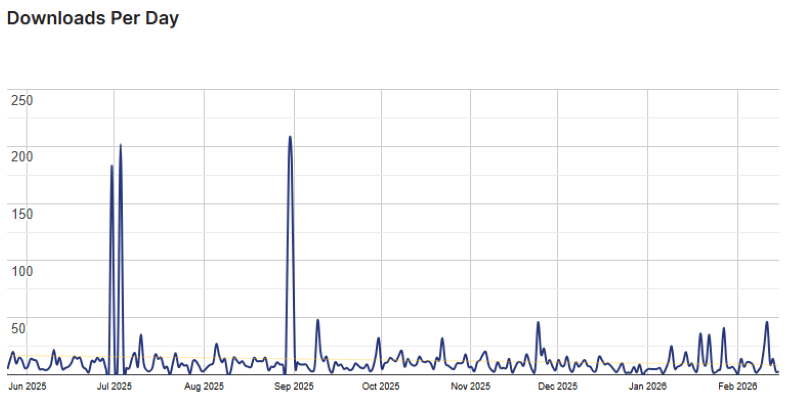
MultilingualPress Usage Statistics
Key Features of MultilingualPress
Here are some key features of MultilingualPress you should know:
- Multisite Performance: Instead of loading multiple languages on one site, it creates a network. This keeps your database lean and your loading speeds at their peak.
- AI-Powered Automated Translation: Seamlessly integrate with DeepL or OpenAI to translate your entire site content automatically and accurately in seconds.
- Full SEO Control: Automatically handles hreflang tags for all language versions, making it easier for search engines like Google to rank your content in the right regions.
- WooCommerce Optimised: Sync products, categories, and tags across multiple language stores while keeping stock levels synchronised automatically.
- No Vendor Lock-in: Unlike other plugins that leave “shortcode mess” behind, MultilingualPress keeps your content as native WordPress data. If you leave, your translations stay.
- Easy Content Sync: Translate posts, pages, and custom post types directly from the original post editor without switching between different site dashboards.
MultilingualPress Coupons, Discounts, and Pricing Plan
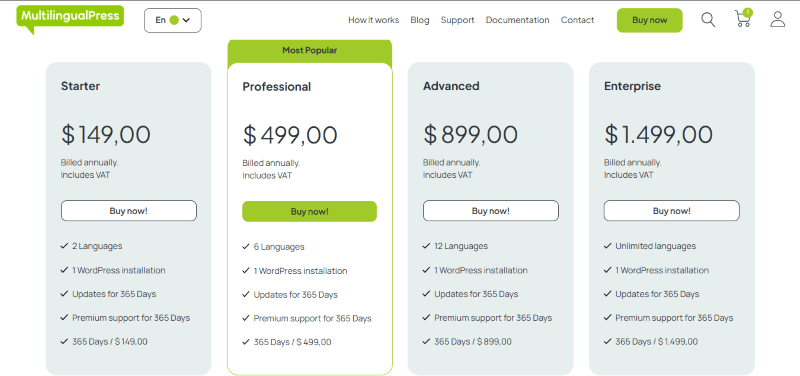
MultilingualPress has a very straightforward pricing plan.
| Starter | Professional | Advanced | Enterprise |
| $ 149 Yearly | $ 499 Yearly | $ 899 Yearly | $ 1,499 Yearly |
| 2 Languages 1 WordPress installation Updates for 365 Days Premium support for 365 Days 365 Days / $ 149,00 |
6 Languages1 WordPress installationUpdates for 365 DaysPremium support for 365 Days365 Days / $ 499,00 | 12 Languages1 WordPress installationUpdates for 365 DaysPremium support for 365 Days365 Days / $ 899,00 | Unlimited languages1 WordPress installationUpdates for 365 DaysPremium support for 365 Days365 Days / $ 1.499,00 |
MultilingualPress Discounts
There are no discounts available for MultilingualPress.
MultilingualPress Lifetime Deals
There are no lifetime deals available for MultilingualPress.
How To Avail The MultilingualPress Coupon?
Step 1: Go to the MultilingualPress pricing section and select the plan you want to buy.
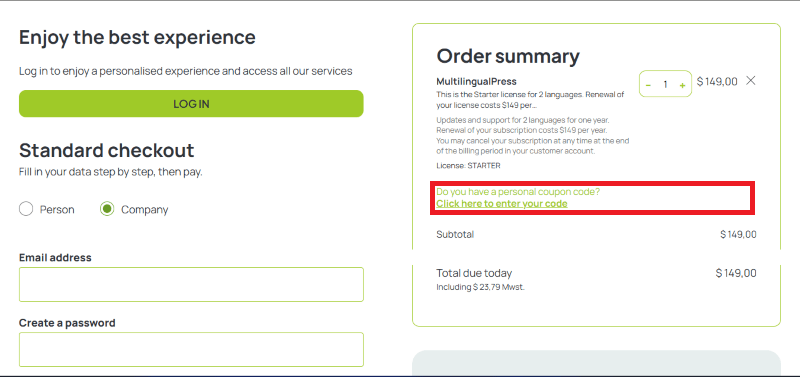
Step 2: On the MultilingualPress checkout page, click on “Have a Promotional code”
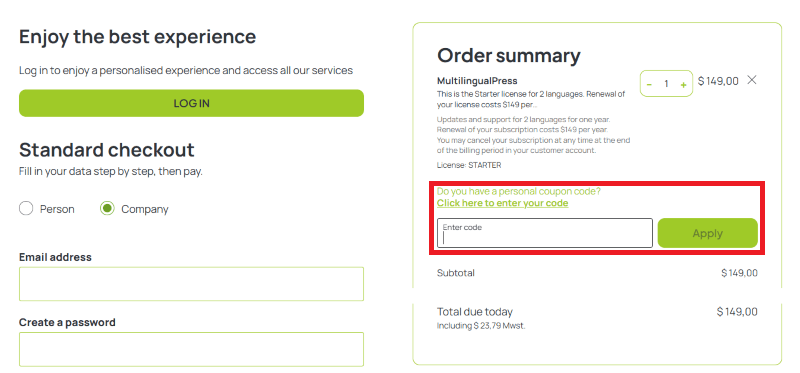
Step 3: Add the discount code in the field and click “Apply” to get the discount.
How To Install The MultilingualPress Plugin on WordPress?
Step 1: Purchase the plugin from the MultilingualPress website and download the ZIP file.
Step 2: Ensure WordPress Multisite is enabled on your hosting environment.
Step 3: Log in to your Network Admin dashboard.
Step 4: Navigate to Plugins > Add New > Upload Plugin and select your ZIP file.
Step 5: Click Install Now and then Network Activate.
Step 6: Go to the “MultilingualPress” menu in your sidebar to begin connecting your language sites.
Step 7: Set up your translation engines (DeepL/OpenAI) to begin automating your content.
For Whom Is This Product Built?
This product is built for:
- Enterprise Companies
- WordPress Agencies
- WooCommerce Store Owners
- Global Brands
- Web Developers
- Large Scale Publishers
- SEO Specialists
MultilingualPress Alternatives
Here are some alternatives to the MultilingualPress plugin.
- WPML (WordPress Multilingual Plugin)
- Polylang
- TranslatePress
- Weglot
| Product Name | WPML By WPML | Polylang By polylang | TranslatePress By Translatepress | Weglot By weglot |
| Number of Websites | 100,000+ | 800,000+ | 400,000+ | 60,000+ |
What MultilingualPress Customers Say
“Easy to set up and manage the pages and posts translations.”
“It works as it should and saves me a ton of time! Awesome plugin with awesome support!
“Unlike many other multi-language plugins, this works perfectly, without all of the difficult interventions to get other plugins also working in more languages.
Good work and thanks for that!”
Read more reviews on WordPress.org.
We’d love to hear your thoughts and opinions on MultilingualPress. Share your experiences and insights in the comments below.
Multilingualpress
You Might Also Like

Verpex Coupon – 2026

Amazon Associates WordPress Plugin Coupon – 2026

Canva Coupon – 2026
From the WPdiscounts Blog
 Most people don’t think much about form plugins until they actually need one. Then suddenly, it becomes a big decision. You start comparing features, pricing,…
April 4, 2026
- If you think your website design is the most important part of your store, think again. Many online shoppers drop their items and leave before…
April 3, 2026
- Most people spend way too much time picking a WordPress theme when starting a blog. It’s easy to get pulled in by designs that look…
March 30, 2026