


Building a digital community is one of the most effective ways to grow an online business. However, for many WordPress users, the technical hurdle of setting up a community has always been too high. You usually had to choose between clunky, old-fashioned forums or expensive, third-party platforms that charge you more every time you get a new member.
FluentCommunity aims to change that.
As someone who reviews WordPress products to help you find the best tools for your business, I have spent time digging into this plugin. In this review, we will look at how FluentCommunity works, how much it costs, and why it might be the missing piece for your website.

What is FluentCommunity?
Get 20% OFF on FluentCommunity
WPdiscounts
FluentCommunity is a modern community-building plugin for WordPress. It was created by the team at WPManageNinja, the same people behind popular tools like FluentCRM and Fluent Forms.
FluentCommunity is built with modern web technology (VueJS). This means it is incredibly fast. When a user clicks a button or posts a comment, it happens instantly without the whole page having to reload. It feels more like a mobile app than a traditional website.
The Big Problems FluentCommunity Solves
If you are a professional trying to manage a website, you likely face three major problems when it is time to build a community:
- The “Social Media Trap”: Facebook Groups are free, but you don’t own them. You can’t control the branding, and your members are constantly distracted by ads and other notifications.
- The Complexity Gap: Older WordPress plugins like BuddyPress are powerful but very difficult to set up. You often need a developer just to make them look decent.
- The Growth Tax: Platforms like Circle or Mighty Networks are beautiful, but they charge “per member” or have high monthly fees. As your community grows, your bill grows with it.
FluentCommunity is designed to sit right in the middle: it is easy to use, you own the data, and it has a flat yearly fee regardless of how many members join.
Core Features Breakdown
To understand if this tool is right for you, we need to look at what it actually does. Here are the standout features that make it a serious contender in the WordPress space.
1. Dedicated Community Portal
FluentCommunity does not just add a page to your existing theme. It creates a dedicated portal. This is a separate, clean area of your site where members log in. This keeps the community experience focused. Members aren’t distracted by your blog sidebars or footer widgets; they are there to talk and learn.
2. Spaces and Groups
Organization is key to keeping a community from becoming a mess. FluentCommunity uses Spaces. Think of these as folders for conversations.
- Public Spaces: Great for general talk or marketing.
- Private Spaces: Perfect for paid members or specific student groups.
- Hidden Spaces: These don’t even appear in the directory unless a user is invited.
3. Built-in Learning Management (LMS)
One of the most surprising features is the built-in course player. If you are an educator, you don’t need to buy a separate LMS plugin. You can host your lessons directly inside FluentCommunity. Members can watch videos, complete lessons, and discuss the course material all in one place.
4. Real-Time Interactions
Engagement dies when people have to wait. FluentCommunity includes:
- Direct Messaging: Members can chat privately with one another.
- Real-time Notifications: Users get on-site alerts and emails when they are mentioned or get a reply.
- Reactions: Just like on social media, users can “Like” or “Love” posts to show support quickly.
5. Member Directories and Profiles
Every member gets a professional profile. They can upload an avatar, write a bio, and see their own activity history. The member directory allows people to find each other, making networking much easier for your audience.
How to Install and Set Up FluentCommunity (Free Version)
Installing the free version of FluentCommunity is just as easy as installing any other common WordPress plugin. You do not need to download files from external websites or handle license keys.
Step 1: Find the Plugin in WordPress
- Log in to your WordPress Admin Dashboard.
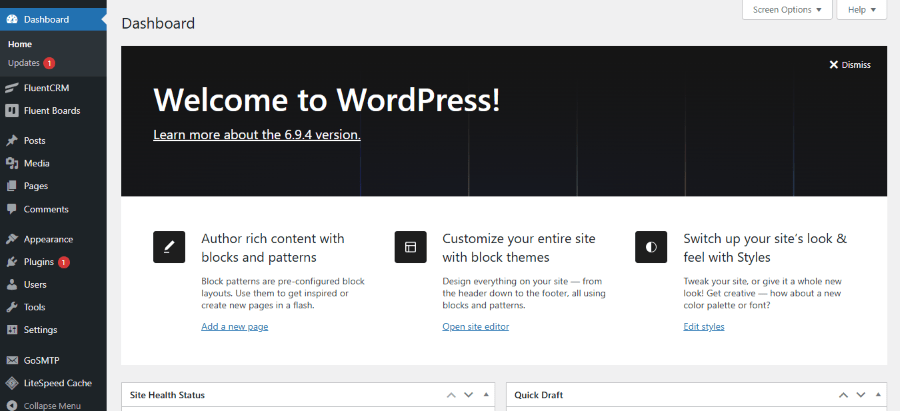
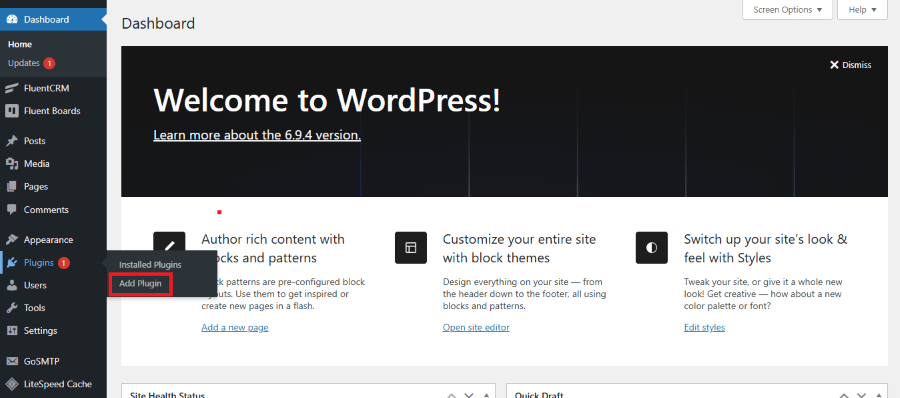
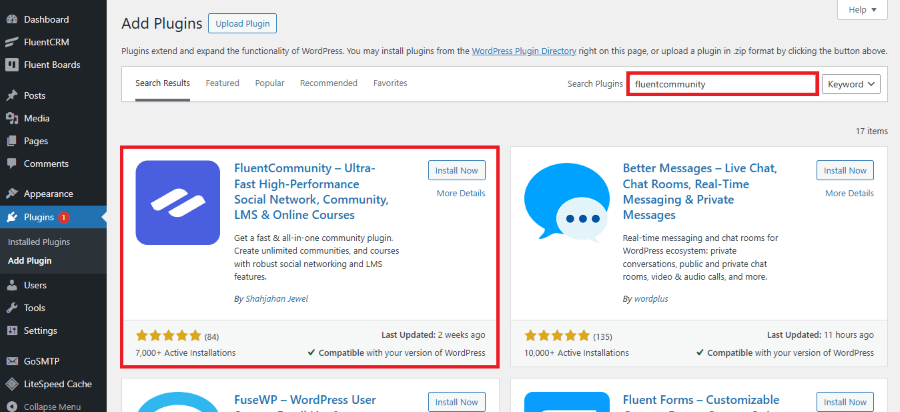
- In the left-hand sidebar, hover over Plugins and click Add New.
- In the search bar at the top right, type “FluentCommunity”. Look for the plugin titled “FluentCommunity – Ultra-Fast Social Network & Community” (developed by WPManageNinja).
Step 2: Install and Activate
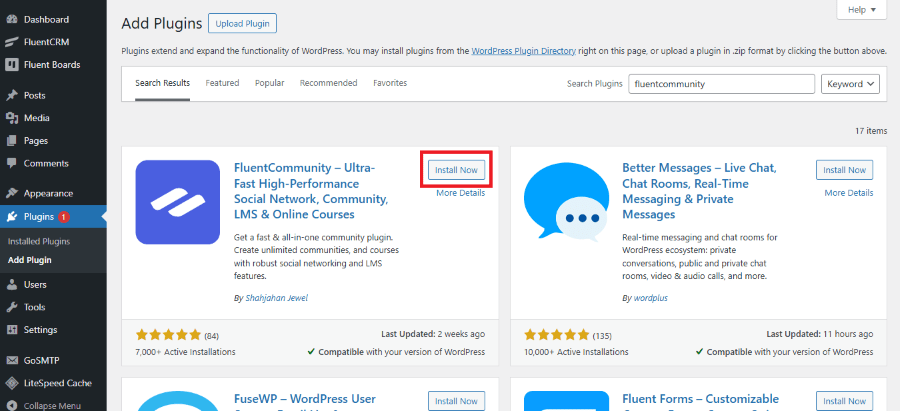
- Click the Install Now button.
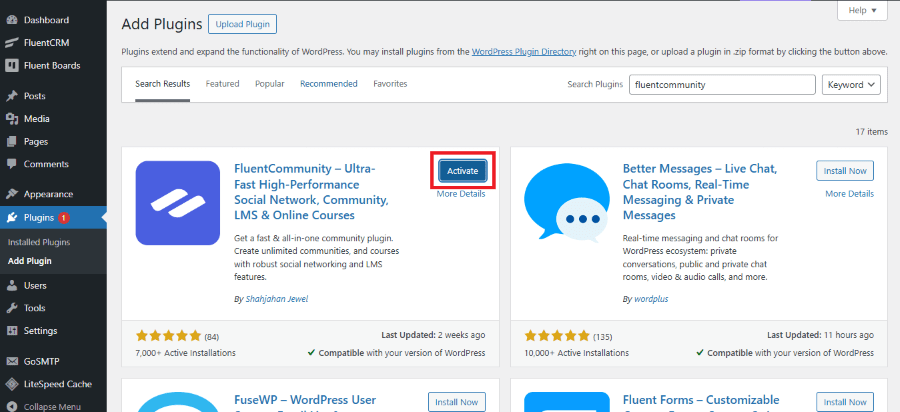
- Once the installation is complete, the button will change to Activate. Click it.
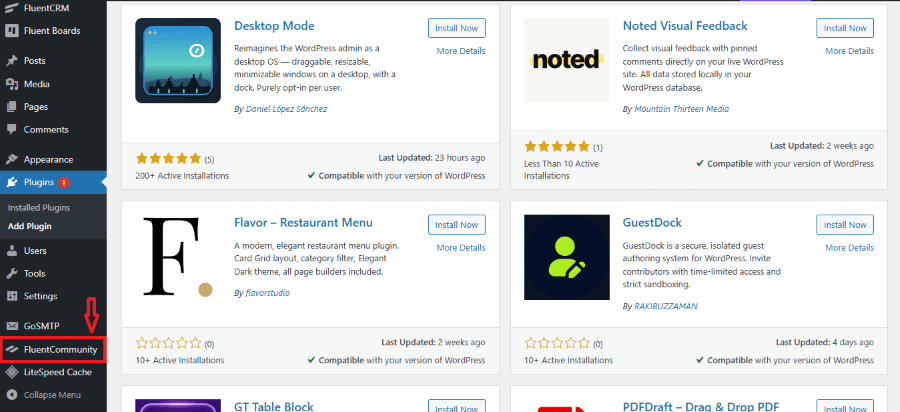
- Upon activation, you will see a new menu item in your sidebar labeled FluentCommunity.
Setting Up Your First Community
You might think building a social network is a month-long project. With FluentCommunity, you can actually have the skeleton of your community ready in about ten minutes. Here is how you do it.
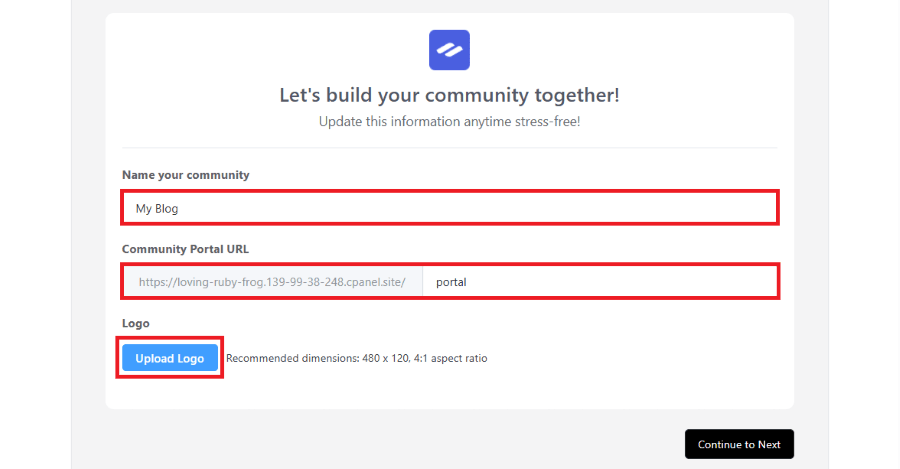
Step 1: Installation and the Setup Wizard
Once you purchase the plugin and upload it to your WordPress site, you will see a “Setup Wizard.” This is a guided tour that asks you for the basics:
- Community Name: What is your group called?
- URL Slug: Usually, people choose /community or /portal.
- Logo: Upload your brand logo so the portal looks professional.
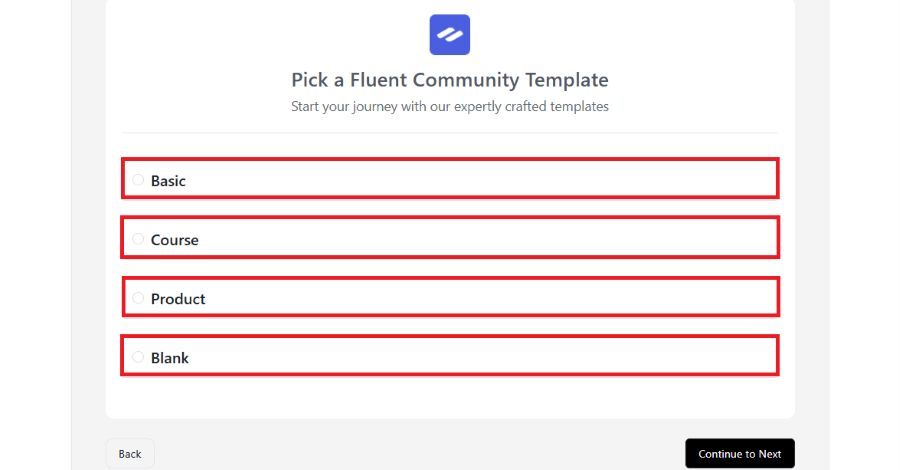
Step 2: Choosing Your Template
The plugin offers a few templates to get you started:
- Basic: For general discussions.
- Course: Optimized for teachers and students.
- Product: Great for software companies providing support.
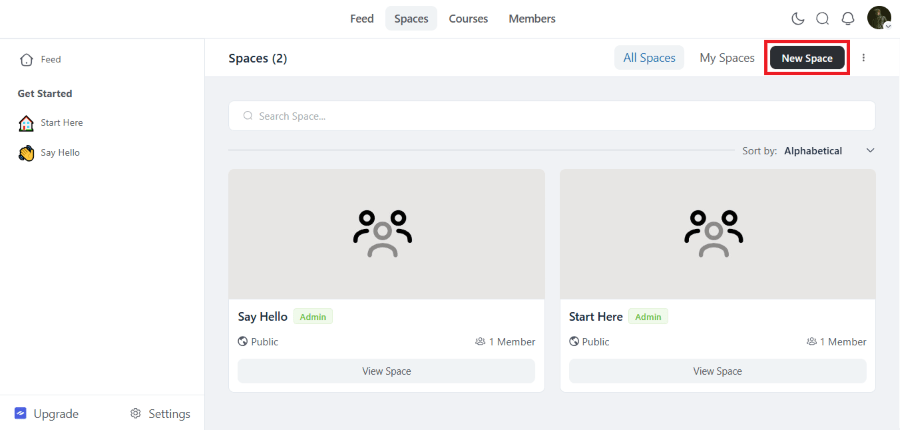
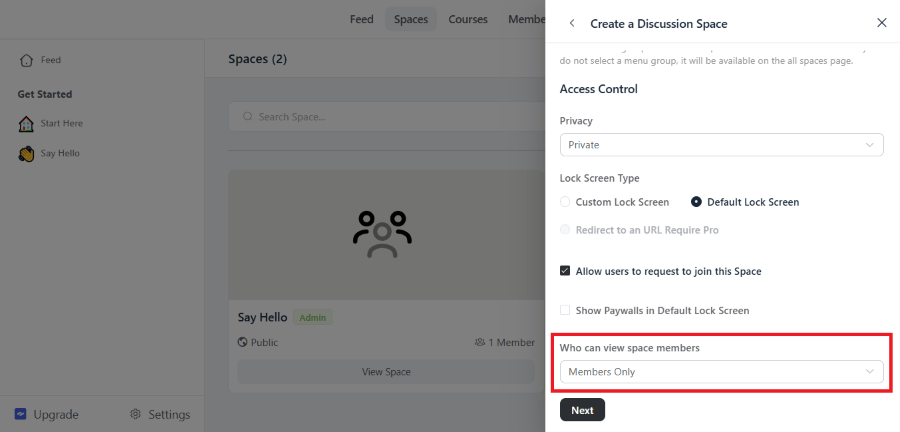
Step 3: Creating Your First “Space”
- Navigate to the “Spaces” menu in the dashboard.
- Click “Add New Space.”
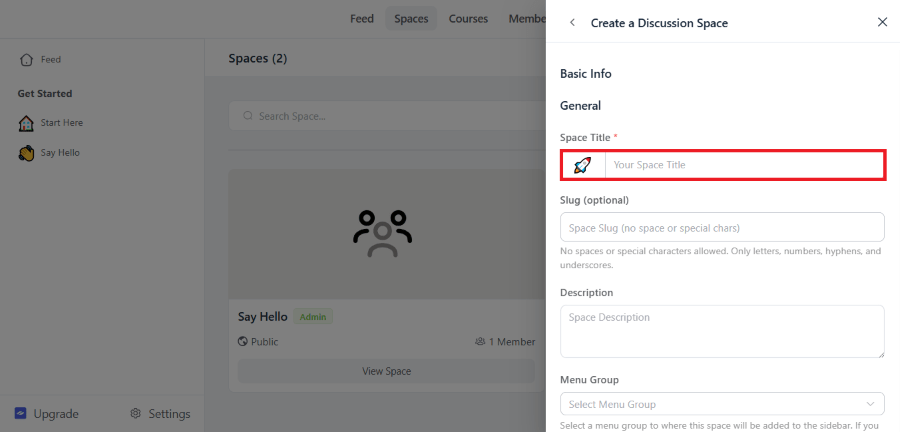
- Give your space a name, like “Introduce Yourself,” and choose who can see it.
Step 4: Inviting Members
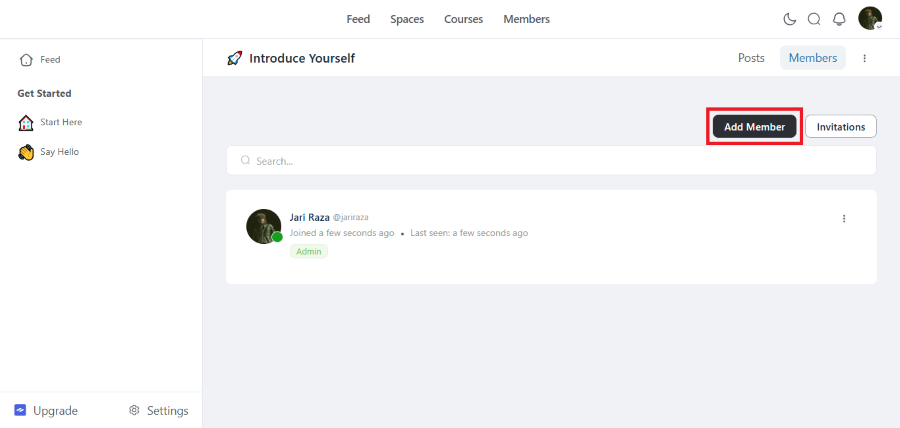
You can manually add members, or if you use FluentCRM, you can set up an automation. For example, when someone buys a product on your site, they can be automatically added to a “Customer Only” space.
Creating and Managing Course in FluentCommunity
Building a community is great, but adding a course turns your website into a true “Academy.” FluentCommunity includes a built-in Learning Management System (LMS) module that allows you to host lessons without needing extra software.
Here is a step-by-step tutorial on how to build and manage your course, designed for the low-tech professional.
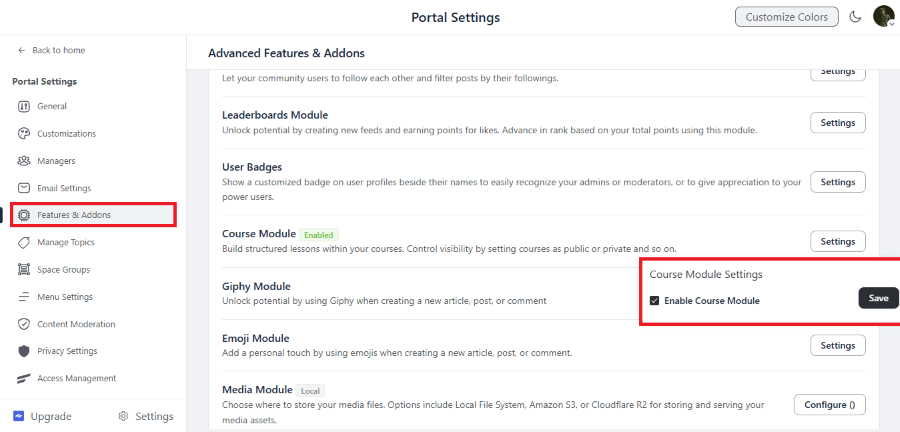
1. Enable the Course Module
Before you can create a course, you must turn on the “LMS” engine.
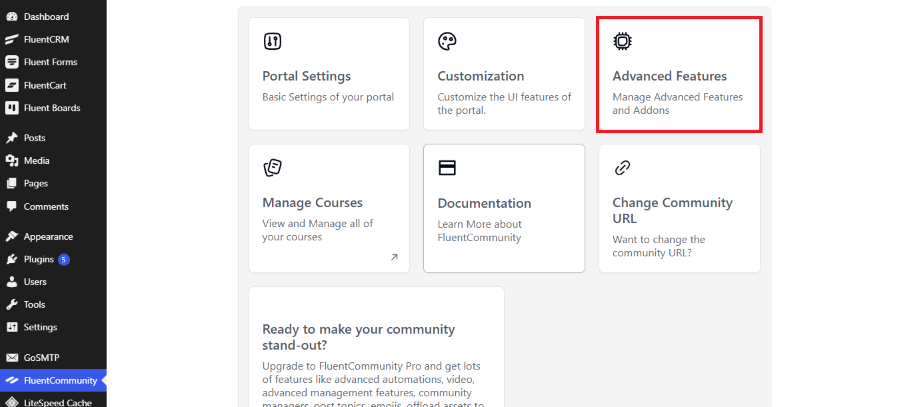
- Go to FluentCommunity in your sidebar. Click on Advanced Features.
- Find the Course Module and click the Settings button. Check the box to “Enable Course Module” and click Save.
2. Creating Your First Course
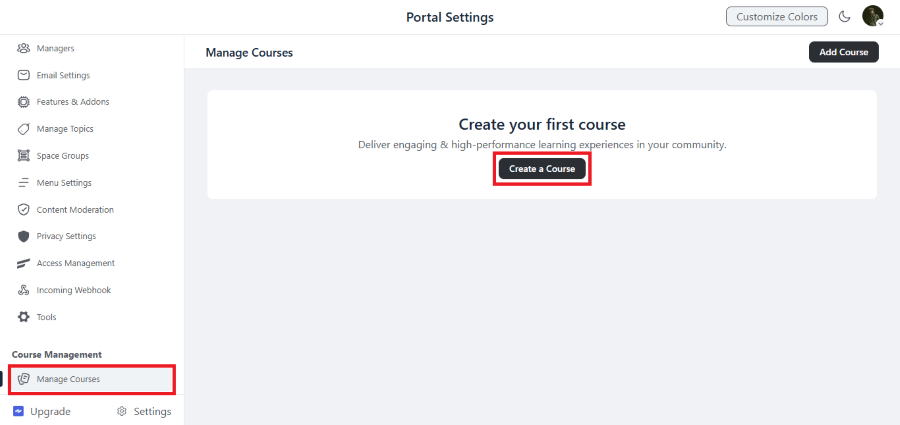
Once enabled, a new menu called Manage Course will appear in your sidebar.
- Click Manage Course and then click the Create Course button.
- General Settings: Fill out your Course Title (e.g., “WordPress Basics”), add a slug (e.g., wp-basics), and write a short description.
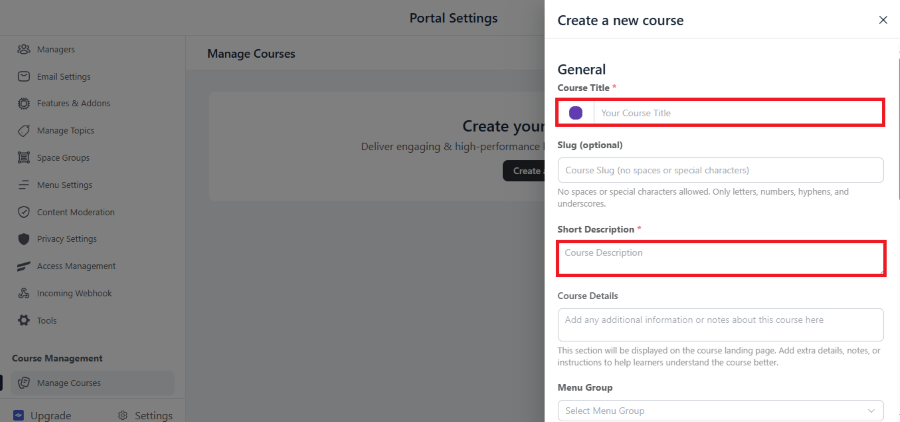
- Course Details: This is like a landing page. Use the editor to explain what students will learn. You can even use the “New Formatting Feature” to type / and insert images or headings to make it look professional.
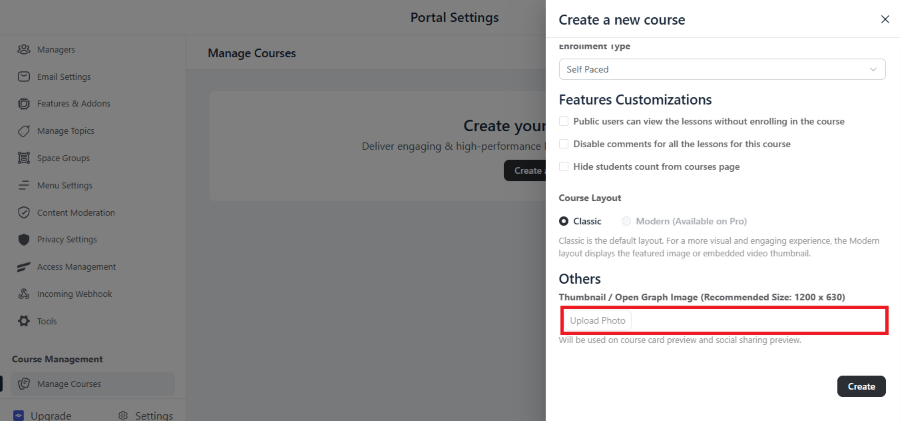
3. Organizing with Sections and Lessons
A course is like a book: Modules are the chapters, and Lessons are the pages.
Adding Section
- Inside your course editor, look for the Add Section tab. Click Add Section.
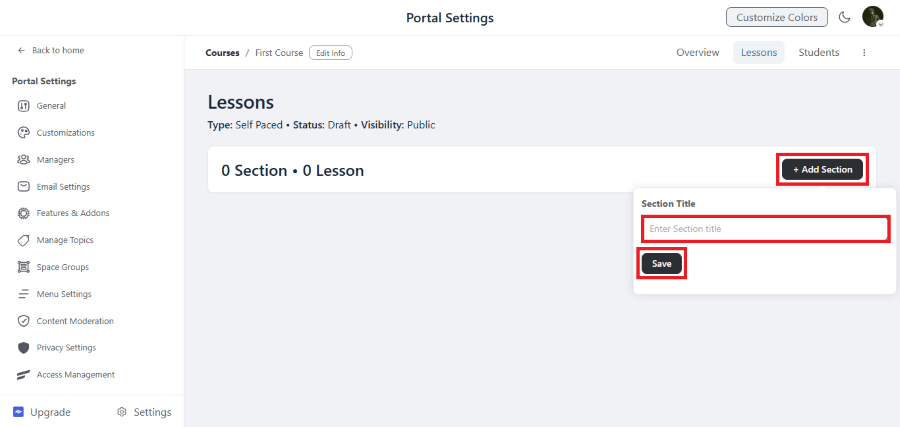
- Give it a name (e.g., “Phase 1: Getting Started”). This helps group your lessons so students don’t get overwhelmed.
Adding Lessons
- Under your new Section, click Add Lesson.
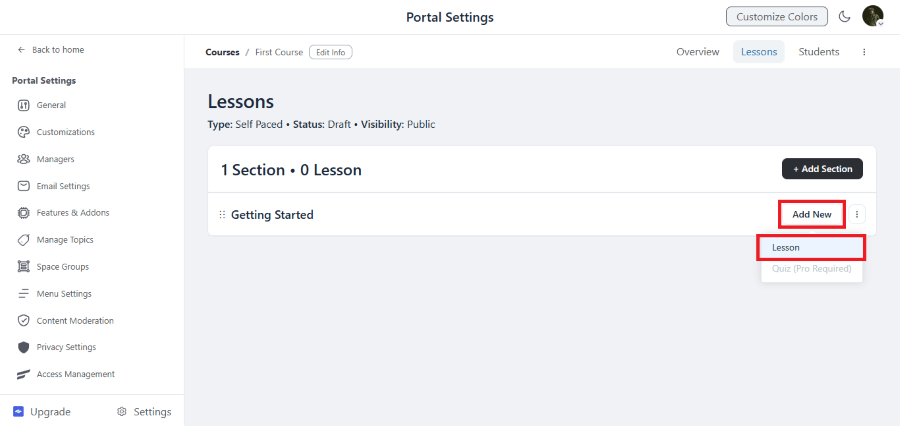
- Type the Lesson Title (e.g., “How to Install a Theme”).
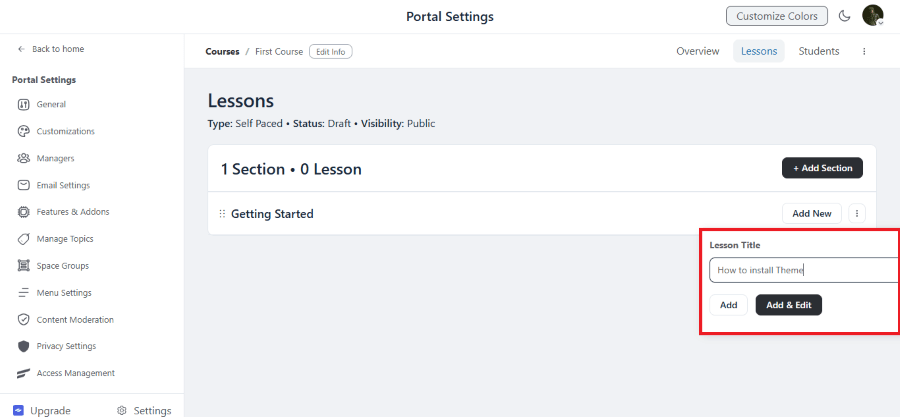
- Click Add & Edit. This will open the editor where you can paste your video links (YouTube, Vimeo, etc.) or write your lesson text.
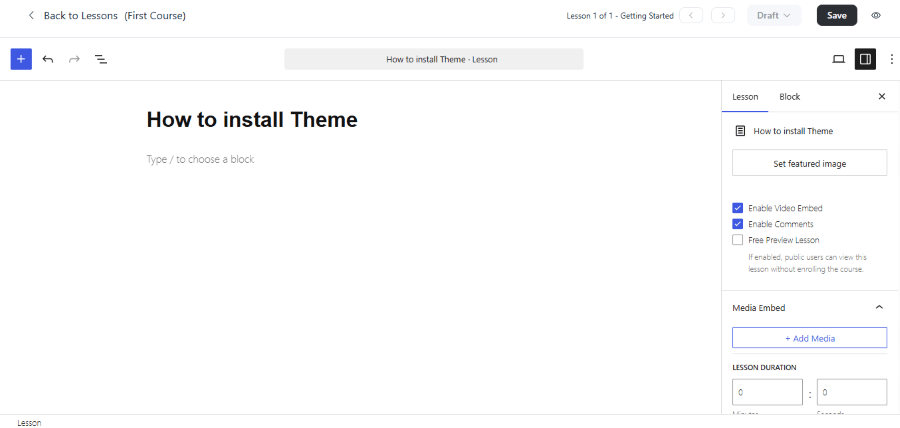
- Tip: If you have many lessons, you can just click “Add” to list them all first and go back to edit the content later.
By following this simple structure, you can transform your community from a simple discussion group into a high-value educational platform.
FluentCommunity vs. The Competition
It is important to know how this compares to other popular tools you might be considering.
| Feature | FluentCommunity | BuddyBoss | Circle.so |
| Platform | WordPress Plugin | WordPress Plugin | External SaaS |
| Setup Ease | Very Easy | Moderate/Hard | Very Easy |
| Speed | Extremely Fast | Can be Heavy | Very Fast |
| Price | Low Yearly Fee | High Yearly Fee | High Monthly Fee |
| Data Ownership | You own it | You own it | They own it |
| Courses | Included | Requires Plugin | Included |
The Takeaway: If you want the speed of a high-end platform like Circle but the control and low cost of WordPress, FluentCommunity is the winner.
FluentCommunity Pricing
Pricing is where FluentCommunity really shines for the “low-tech” professional who is watching their budget.
Annual Pricing:
| Single Site License | 5 Sites License | 15 Sites License |
| $199 | $399 | $699 |
| 1 Domain 1 Year Plugin Update 1 Year Plugin Support All Features Included | 5 Domain 1 Year Plugin Update 1 Year Plugin Support All Features Included | 15 Domain 1 Year Plugin Update 1 Year Plugin Support All Features Included |
Lifetime Pricing:
| Single Site License | 5 Sites License | 15 Sites License |
| $399 | $799 | $1599 |
| 1 Domain Lifetime Plugin Update Lifetime Priority Support All Features Included | 5 Domain Lifetime Plugin Update Lifetime Priority Support All Features Included | 15 Domain Lifetime Plugin Update Lifetime Priority Support All Features Included |
Get 20% OFF on FluentCommunity
WPdiscounts
There are no “hidden” fees. You don’t pay more because you have 1,000 members instead of 100. This makes it much easier to predict your business expenses as you scale.
Pros and Cons
No product is perfect. Here is an honest look at the good and the bad.
The Pros
- Modern Look: It feels like a 2026 app, not an old website.
- Performance: It won’t slow down your WordPress site.
- All-in-One: Having a community and courses in one plugin saves you money and technical headaches.
- Global Search: The search bar is very powerful, making it easy for members to find old discussions.
The Cons
- Hosting Requirements: Because it is high-performance, you shouldn’t run this on the cheapest $2-a-month hosting. You need a decent host to handle many active users.
- Young Product: While it is stable, it is newer than some competitors, so the library of third-party add-ons is still growing.
Who Should Buy FluentCommunity?
After testing the features and the workflow, this plugin is best suited for three types of people:
- The Digital Creator: If you sell knowledge, this is your new home. You can teach your courses and host your fans in the same place.
- The Software Developer: It is the best way to handle “feature requests” and community support without paying for a separate helpdesk tool.
- The Small Business Owner: If you want to build a “VIP” area for your best customers to talk to you and each other, this is the most cost-effective way to do it.
Final Thoughts
FluentCommunity is a breath of fresh air for the WordPress ecosystem. It removes the technical friction that used to stop people from building their own social hubs. It is fast, it looks beautiful, and it respects your budget.
By keeping your community on your own website, you are building an asset that you own. You aren’t at the mercy of a social media company. If you are looking for a way to increase member engagement and automate your workflow, FluentCommunity is a tool you should definitely consider.
It is rare to find a plugin that balances advanced features with such a simple setup process. For the educated professional, this is likely the best community solution available on WordPress today.