
Customer support can take up a surprising amount of time when you’re running a WordPress website. Visitors have questions about your products, services, pricing, and how things work. Some of those questions are answered somewhere on your website already, but that doesn’t stop people from sending emails or opening support tickets to ask them.
Imagine having a personally trained AI chatbot that is aware of all the content, products, and pages that you have on your website, and a customer can directly ask a question about your service and be answered instantly. A chatbot like that can save you a lot of time and reduce repetitive emails.
The challenge, however, is finding one that’s easy to set up, provides useful answers, and doesn’t add another expensive monthly subscription to your business.
That’s where Resolver comes in. It’s a relatively new WordPress plugin that turns your website content into a searchable knowledge base and uses AI to answer visitor questions. It can automatically update its training data as you edit existing pages or publish new content.
What caught my attention is that Resolver comes from Ben Sibley and Andrew Mead, the developers behind Independent Analytics. Ben is already known for creating great WordPress products, which gave me a positive first impression before I even started configuring the plugin.
I also found the initial setup surprisingly simple. It took me less than a minute to configure my own AI chatbot and get it working on my website.
In this review, we’ll look at how Resolver works, what you get in the free and Pro versions, how its AI integrations and pricing work, and whether it’s worth adding to your WordPress website.
What Is Resolver?
Resolver is an AI chatbot plugin with free and pro versions, built specifically for WordPress. Instead of requiring you to manually write hundreds of answers or upload a separate knowledge base, it can learn from your existing website content.
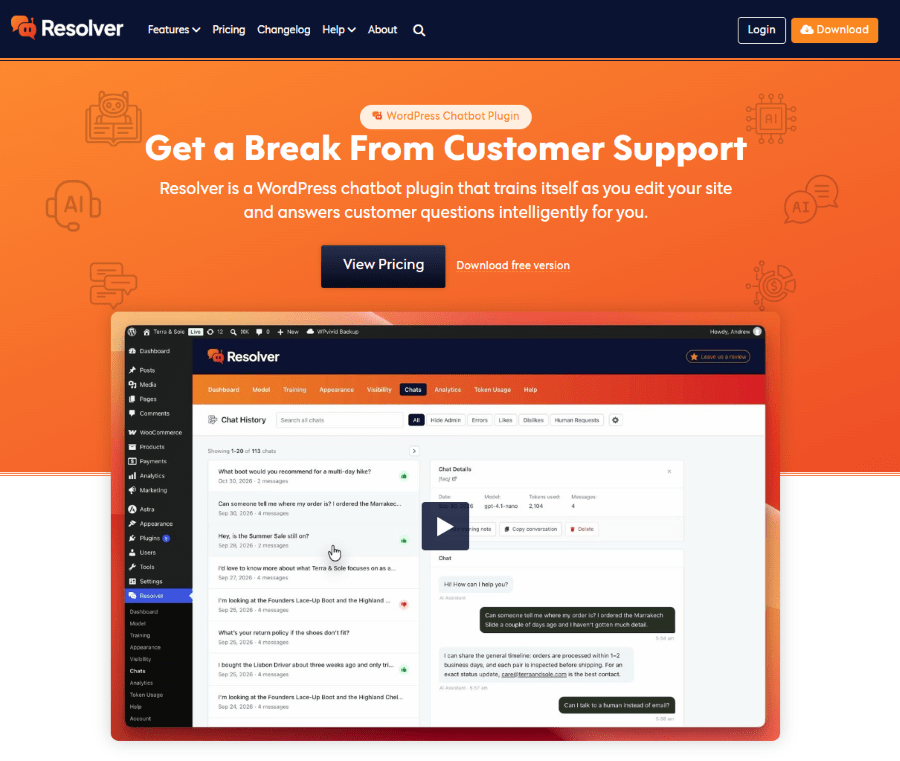
You choose the pages and posts you want it to use, connect an AI model from Google Gemini, Claude, or OpenAI, and Resolver builds a knowledge base from that content. When someone asks a question, it searches the material you’ve provided and uses the relevant information to generate an answer.
The plugin supports three major AI platforms:
- OpenAI (ChatGPT)
- Anthropic (Claude)
- Google (Gemini)
You can choose the provider and model you prefer, using your own API key.
One of Resolver’s most interesting features is its automatic training system. When you update an existing page, Resolver can detect the changes and retrain on its content. You can also configure it to track new pages as they’re published, so you don’t have to keep updating the chatbot manually.
Resolver is designed for customer support, product questions, FAQs, and general website assistance. It’s particularly interesting for businesses that already have useful information published across their websites but don’t have the time to answer the same questions repeatedly.
My First Experience With Resolver
I always appreciate WordPress plugins that don’t make me spend half an hour figuring out where everything is.
Resolver made a good first impression here.
Getting my chatbot configured and running on my website took me less than a minute. The setup process is straightforward, and you don’t need to understand how AI models work or have any coding knowledge to get started.
You do need an API key from one of the supported AI providers. Once the connection is in place, you can select your preferred model, choose the content you want Resolver to learn from, and configure the chatbot.
I like that the plugin doesn’t overwhelm you with complicated settings right from the beginning. You can get a basic chatbot running first and explore the additional configuration options as you need them.
For me, this is an important part of the overall experience. An AI chatbot is only useful when website owners can actually get it working without hiring a developer or spending hours configuring integrations.
I haven’t spent enough time testing every advanced feature to make broad claims about response accuracy across different websites. However, the initial setup experience has been very encouraging.
How Does Resolver Work?
Resolver uses your website’s existing content as the knowledge source for its chatbot.
The process is relatively simple. You connect an AI provider, select the content you want the chatbot to learn from, and let Resolver prepare that information for answering questions.
Here’s what happens behind the scenes.
1. Connect Your Preferred AI Platform
First, you need an API key from OpenAI, Anthropic, or Google.
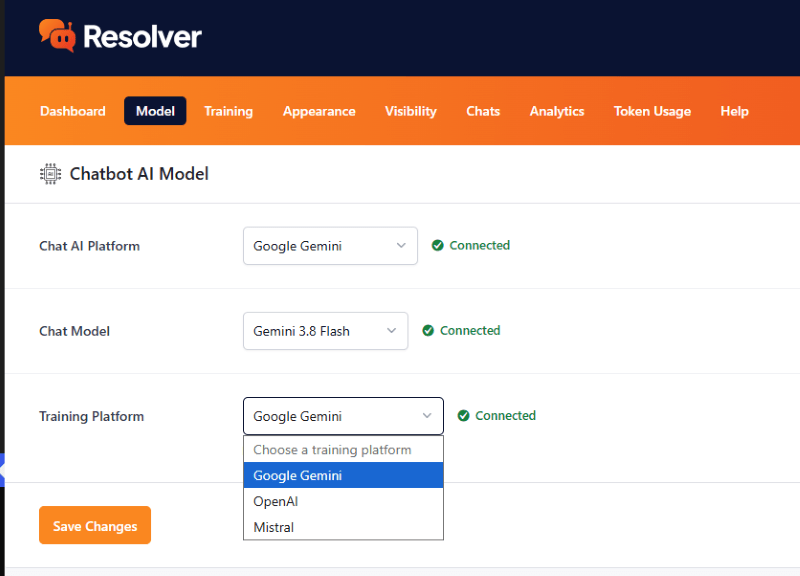
Resolver includes a Connectors section in your WordPress dashboard where you can install the relevant connector and enter your API key. Once connected, you can select the AI platform and model you want to use.
This is a useful approach because you’re not locked into one AI provider. You can choose a model based on its capabilities, pricing, and the type of responses you need.
2. Train Resolver on Your Website Content
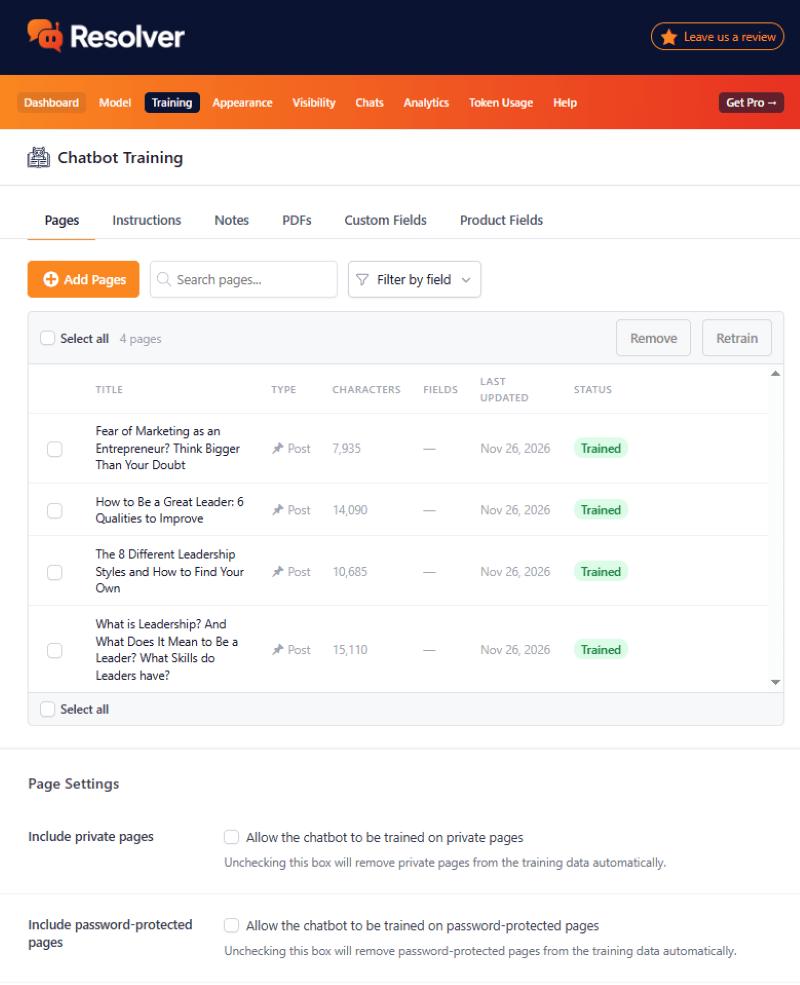
Next, choose the pages, posts, or other supported content you want Resolver to use when answering questions.
You don’t need to manually write answers for every possible question. Resolver processes your selected content and makes it searchable by the chatbot.
This is worth understanding: Resolver doesn’t retrain an entire AI model on your website. It creates a searchable knowledge base from your content and uses relevant information when generating responses. This allows the chatbot to answer questions using information specific to your business.
According to Resolver, the initial training can process more than 1,000 pages in seconds. That’s particularly useful for websites with large content libraries.
3. Let Resolver Answer Visitor Questions
Once training is complete, your chatbot can start answering questions through a chat widget on your website.
When a visitor asks something, Resolver searches the trained content for relevant information and passes it to your selected AI model to generate a response.
The result is a chatbot that can answer questions based on your own website rather than relying entirely on the AI model’s general knowledge.
You can also preview the chatbot before making it available to visitors.
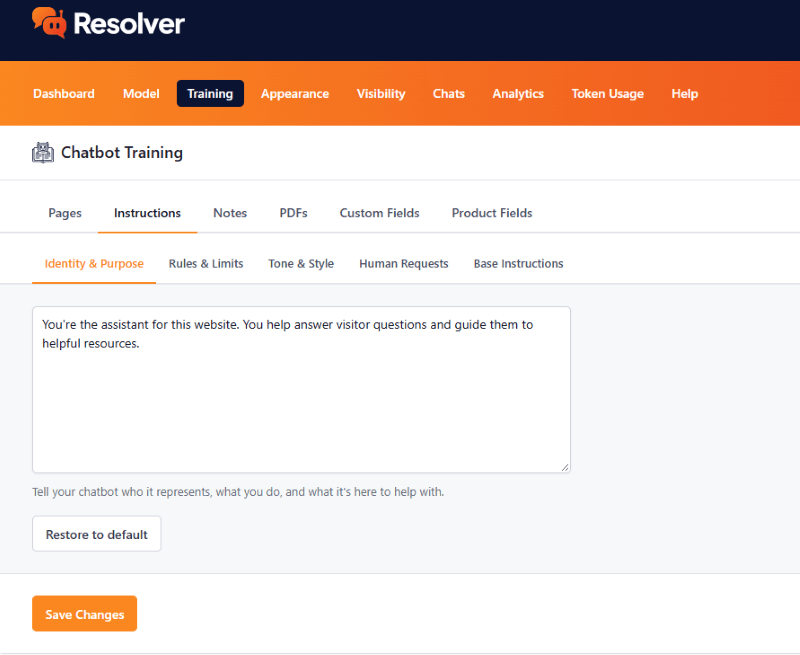
4. Set Pre-defined Rules & Instructions in Resolver
I really appreciate that plugin authors thought of adding these options and gave users control to define purpose, rules, limits, tone, style, and what happens if someone requests to talk to a human.
Some instructions are prefilled; even with the default settings, the chatbot is usable for many use cases.
5. Customize the Chatbot Appearance
Resolver also gives you control over how the chatbot looks on your website. You don’t have to use the default name, greeting, or colors. You can make a few changes to give it a more familiar feel and better match your website’s branding.
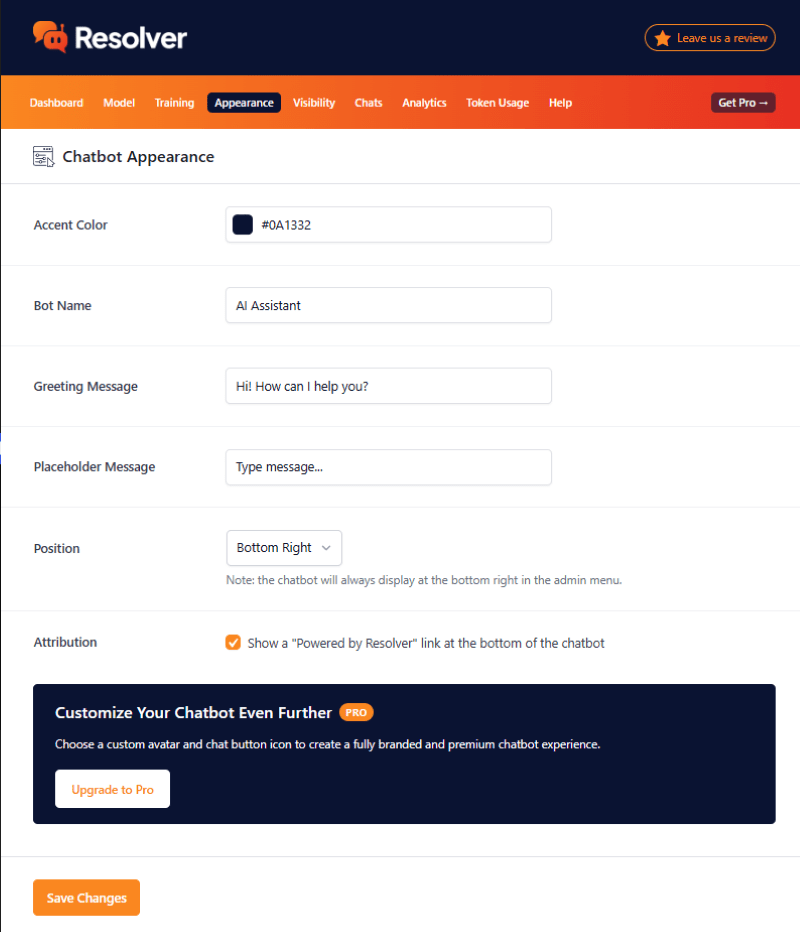
Under the Appearance tab, you can configure:
- Accent Color: Change the chatbot’s accent color to match your website’s design.
- Bot Name: Give your chatbot a custom name instead of keeping the default “AI Assistant” label.
- Greeting Message: Set the message visitors see when they open the chat. For example, you could use “Hi! How can I help you today?” or a greeting that reflects your business.
- Placeholder Message: Customize the text shown in the message input field before someone starts typing.
- Position: Configure the chatbot’s position using the available placement setting. The screenshot shows Bottom Right as the selected position.
- Attribution: Choose whether to display the “Powered by Resolver” link at the bottom of the chatbot.
These are relatively simple settings, but they make a difference. A chatbot that uses your business name, brand colors, and a suitable greeting feels more like part of your website rather than a generic third-party widget.
Resolver Pro also lets you use a custom avatar and chat button icon, giving you more options to create a branded chatbot experience.
6. Control Where the Chatbot Appears
Not every page on your website needs a chatbot. For example, you might want it to appear on your product pages, pricing page, and documentation, but keep it off your checkout, login, or other pages where it could get in the way.
Resolver includes visibility settings to help you control where the chatbot is displayed.
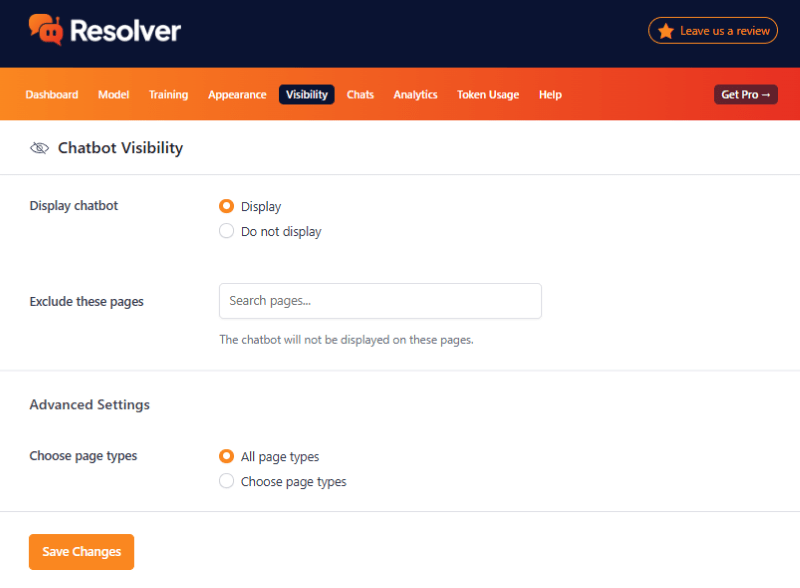
You can turn the chatbot on or off across your website using the Display and Do not display options. There’s also an option to exclude specific pages. Simply search for the pages you want to exclude, and Resolver won’t display the chatbot on those pages.
Under Advanced Settings, you can also control which page types should display the chatbot. You can leave it enabled for all page types or choose specific types instead.
I like having this level of control because it means you don’t have to display the chatbot everywhere just because you’ve installed it. You can make it available where visitors are most likely to need assistance and keep it out of the way on pages where it isn’t necessary.
Resolver’s Main Features
Resolver includes several useful features in its free version, while the Pro version adds more advanced training and reporting capabilities.
Let’s look at the features that make it worth considering.
Automatic Training
This is probably one of Resolver’s biggest selling points.
With many chatbot solutions, you need to update the knowledge base whenever your website content changes. That can become tedious when you’re managing a large website with hundreds of pages, products, and articles.
Resolver takes a different approach. You select the content it should track, and it automatically detects updates and retrains when that content changes.
You can also configure it to monitor specific post types, allowing new content to be included automatically after publication.
For example, a business publishing new service pages or regularly updating its documentation doesn’t have to remember to manually update the chatbot every time.
Support for Multiple AI Models
Resolver supports OpenAI, Anthropic, and Google, giving you access to their respective AI models.
This flexibility is useful because different models have different strengths, response styles, and API costs.
You can experiment with different models to find one that provides the best balance between response quality and running costs for your website.
It also means you aren’t tied to a single provider if your requirements change later.
Customizable Chat Widget
The chatbot widget can be customized to better match your website’s branding.
You can adjust its appearance, name, colors, and other visual settings instead of displaying a generic chatbot that looks disconnected from the rest of your website.
Resolver also includes visibility settings, allowing you to control which pages display the chatbot. This is useful when you only want it to appear on specific sections, such as product pages, pricing pages, or your knowledge base.
Chat History
Resolver saves conversations so you can review what visitors have been asking.
This is useful for understanding the questions people have about your business and identifying information that might be missing from your website.
For example, if visitors repeatedly ask about your refund policy or a particular product feature, you may want to make that information easier to find or add more detail to your existing content.
Token Monitoring
Using your own AI API keys gives you more control over costs, but you also need a way to monitor usage.
Resolver includes a Token Monitoring section where you can see how many tokens your chatbot is consuming. You can also configure daily and monthly usage limits.
This is an important feature because AI API costs depend on the model you select and the number of conversations your visitors have.
Rather than letting usage grow without visibility, you can monitor consumption and set limits that work for your budget.
Advanced Features in Resolver Pro
Resolver Pro adds several features for websites that need more than basic page-based training.
These include:
Custom Fields: Train the chatbot using custom fields, including fields created with Advanced Custom Fields, CMB2, Meta Box, Pods, and Secure Custom Fields. You can also add custom fields manually.
WooCommerce Product Data: Allow the chatbot to use product information such as prices, dimensions, weights, and product attributes when responding to customer questions. This is especially useful for stores with large product catalogs.
PDF Training: Train Resolver using PDF documents stored in your WordPress Media Library. This can be useful for product manuals, documentation, user guides, and other resources that aren’t published as regular web pages.
Training Notes: Add additional information manually when your existing website content doesn’t cover a particular topic. This gives you another way to improve the chatbot’s knowledge without publishing a new page.
Chat Analytics: Review chatbot activity and see how many conversations and messages it’s handling over time.
User Feedback: Allow visitors to rate chatbot responses so you can identify answers that aren’t helpful and improve the information available to the chatbot.
Human Requests: Track how often visitors ask to speak with a real person. This can help you understand where automated support isn’t enough and when customers need assistance from your team.
These additions make the Pro version more interesting for WooCommerce stores, membership websites, and businesses with larger knowledge bases.
Resolver Free vs. Pro: What’s the Difference?
One thing I like about Resolver is that the free version isn’t just a limited trial designed to push you into buying a license.
The free plugin already includes the core functionality needed to launch an AI chatbot on your website. You get AI integrations, automatic training, customizable styles, chat history, visibility settings, and token monitoring.
There are no restrictions on the number of chats, training, or websites in the free version, according to the developer.
Resolver Pro is for website owners who need additional training sources and reporting features.
| Feature | Free | Pro |
| OpenAI, Anthropic, and Google integrations | Yes | Yes |
| Automatic content training | Yes | Yes |
| Chat widget customization | Yes | Yes |
| Chat history | Yes | Yes |
| Visibility settings | Yes | Yes |
| Token monitoring | Yes | Yes |
| Custom field training | No | Yes |
| WooCommerce product fields | No | Yes |
| PDF training | No | Yes |
| Training notes | No | Yes |
| Chat analytics | No | Yes |
| Visitor feedback | No | Yes |
| Human request tracking | No | Yes |
For a standard business website, the free version may be enough to get started. If you run a WooCommerce store or need to train your chatbot using custom fields, documents, and additional data sources, Pro offers more flexibility.
Resolver Pricing
Resolver follows a freemium model. You can download and use the free plugin without paying for a Resolver subscription.
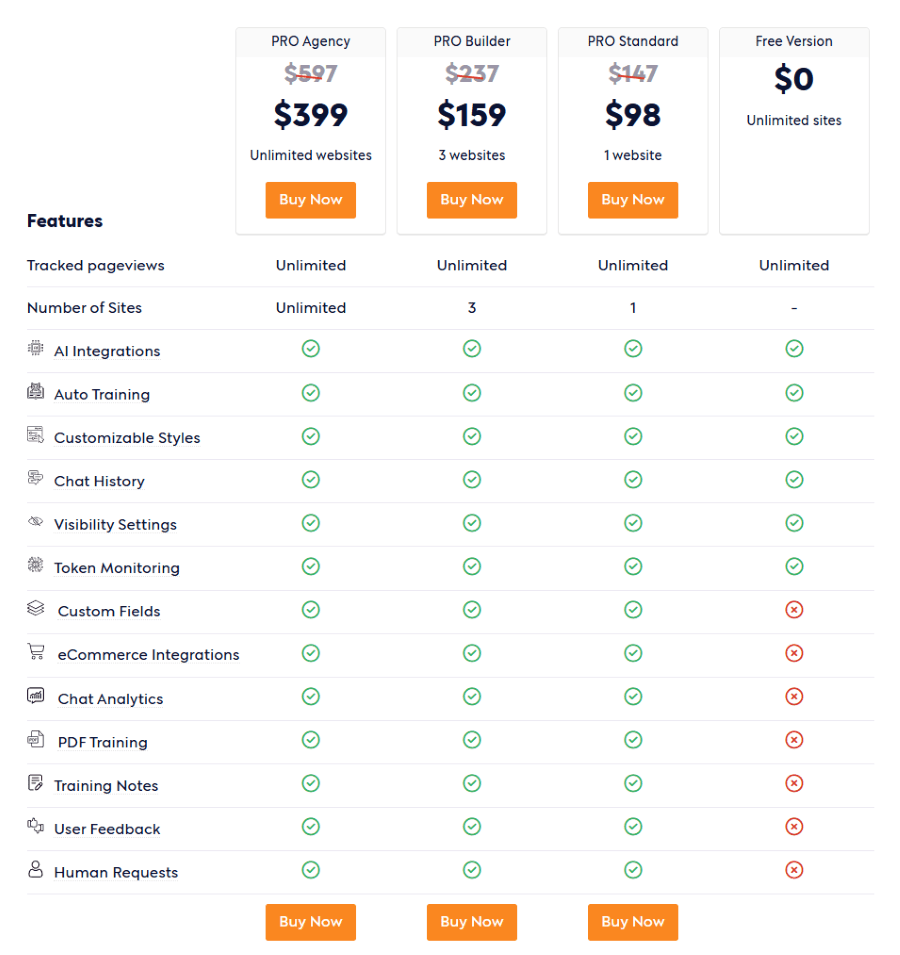
For additional features, Resolver Pro offers both annual and lifetime licenses.
The currently listed annual plans are:
| Plan | Websites | Annual Price |
| Free | Unlimited | $0 |
| Pro Standard | 1 | $49/year |
| Pro Builder | 3 | $79/year |
| Pro Agency | Unlimited | $199/year |
Lifetime Resolver Chat Bot Plans
| Plan | Websites | Annual Price |
| Pro Standard | 1 | $147 once |
| Pro Builder | 3 | $237 once |
| Pro Agency | Unlimited | $597 once |
All Pro plans include the same premium features. The main difference is the number of websites you can activate the license on.
The lifetime plans look better value if you plan to use AI chat bots on your WordPress website builds, and truth be told it will become the norm of having smart AI chat bots providing quick support.
There is also a 30-day money-back guarantee for Pro purchases.
One thing to understand about Resolver’s pricing is that the AI usage is billed separately. You provide your own API key, and the AI provider charges you based on usage. This is different from chatbot platforms that bundle AI credits into a monthly subscription.
The advantage is that you only pay the AI provider for what you use, and you aren’t paying Resolver an additional monthly fee for conversations or AI credits. However, your actual costs will depend on the model you choose and how much your visitors use the chatbot.
For many smaller websites, this could be an affordable way to add AI-powered support without committing to another recurring software subscription.
What I Like About Resolver
There are a few things that stand out to me.
First, the setup experience is excellent. Getting an AI chatbot running in less than a minute is a good indication that the developers have put thought into the user experience. You don’t need to be an AI expert to get started.
Second, I like the decision to let users connect their own AI providers. It gives website owners more control over model selection and usage costs, instead of locking them into a fixed AI subscription.
The automatic training feature is another practical addition. A chatbot is only useful when its knowledge reflects the current information on your website. Automatically tracking page updates and new content can save a lot of manual work.
I also appreciate that the free version includes the core features needed to run a chatbot. You can install it, connect an AI provider, train it on your website, and see how it works before deciding whether you need Pro.
Finally, Resolver comes from the team behind Independent Analytics. Ben Sibley and Andrew Mead have already built a product that many WordPress users know, so I’m interested to see how Resolver develops over time.
What Could Be Better?
Resolver is still a new plugin, so there are a few things worth considering before making it a central part of your customer support setup.
You Need Your Own AI API Key
Using your own API key gives you more control over costs, but it also introduces an extra step.
You’ll need to create an account with an AI provider, generate an API key, and fund the account to cover usage. Someone who has never worked with AI APIs might find this confusing at first.
Resolver does provide instructions to guide users through the process, and once the connection is configured, you don’t need to manage it every time someone starts a conversation.
It could be better if Resolver provides built-in API setup, which obviously will be charged separately based on usage.
Also, adding more AI models would be better, as a lot of people also use Open Models, or Models from DeepSeek, Alibaba, locally hosted LLMs, etc.
Answer Quality Depends on Your Content and AI Model
Resolver can only provide useful answers when it has access to relevant information.
If your website has outdated documentation, incomplete product descriptions, or missing details, the chatbot may not be able to answer certain questions accurately.
The AI model also plays a role in the quality of responses. It’s worth testing different models, reviewing chat history, and improving your training content to get better results.
I’d recommend treating Resolver as a way to handle common questions, not as a complete replacement for human customer support.
Consider How Visitor Data Is Processed
Resolver stores chat and training data in your WordPress database, but it also needs to communicate with your selected AI provider to generate responses.
Depending on your configuration, website content, visitor messages, and relevant conversation context are sent to the provider’s API.
This is normal for AI-powered chatbots, but businesses should understand how their chosen provider handles data and make sure their privacy policy reflects the use of an AI chatbot.
Is Resolver Worth Using?
Resolver is an interesting addition to the WordPress AI plugin space, especially for website owners who want to add a chatbot without paying another monthly SaaS subscription.
Its biggest strengths are its straightforward setup, automatic content training, support for multiple AI providers, and a free version that includes the core chatbot functionality.
I particularly like the idea of a chatbot that keeps its knowledge up to date as you publish and edit content. That’s a practical feature for businesses that regularly update their website and don’t want to maintain a separate knowledge base.
It’s also worth mentioning that Resolver is built by Ben Sibley and Andrew Mead, the creators of Independent Analytics. That’s a good starting point, although the plugin still needs time and wider adoption to build a proven track record.
Based on my initial experience, I would recommend giving Resolver a try if you’re looking for an AI chatbot for your WordPress website. The free version gives you enough functionality to get started, and you can move to Pro when you need features such as PDF training, custom fields, WooCommerce data, or chat analytics.
Resolver is still new, but it’s off to a promising start.
Download Resolver for free or visit Resolver’s official website to learn more about its features and Pro plans.