
Many creators find themselves trapped between two difficult paths: paying expensive monthly fees to hosted platforms that eat into their profits, or patching together a dozen different WordPress plugins that slow down their website and frustrate their students.
This is where Creator LMS enters the picture. Developed by the experienced team behind popular WordPress products like WPFunnels and Mail Mint, Creator LMS is built to solve both the high monthly costs of SaaS builders and the technical complexity of traditional WordPress course plugins.
Take a look at how Creator LMS is better than LearnDash and Tutor LMS by comparing their features, go through practical tutorials, and analyze its cost to see if it is the right choice for your WordPress website.
The True Cost of Online Course Platforms: Why Bloat and Lock-in Matter
If you want to sell online courses, you have two traditional options. You can use an all-in-one hosted software-as-a-service (SaaS) platform, or you can build your course on your own WordPress site using a learning management system (LMS) plugin. Both paths have hidden costs that can hurt your business growth.
SaaS based LMS with lock-in vs WordPress LMS Plugins with Freedom.
When you choose a traditional course platform, you often face severe financial or technical challenges:
- The Monthly SaaS Rent: Popular hosted platforms like Kajabi and Teachable charge high monthly fees. Kajabi starts at $1716 per year, even if you only have a few students. This recurring cost applies pressure to make sales every single month just to keep your content online.
- The Transaction Fee Trap: Some basic SaaS plans charge transaction fees of up to 7.5 percent on every sale. When you combine this with standard payment gateway fees, you lose a significant portion of your revenue:
- The WordPress Add-on Maze: If you switch to traditional WordPress LMS plugins, you often have to install separate plugins, often called add-ons, for checkout, certificates, student communities, sales funnels, and email marketing. This creates a bloated backend, increases the risk of plugin conflicts, and slows down your page loading speeds.
The Benefits of Upgrading to an All-in-One Modern LMS
Using a modern, lightweight, unified course builder like Creator LMS changes your entire administrative workflow:
- Single-Plugin Ecosystem: Instead of managing multiple subscriptions, you get course creation, native payments, certificate building, and quiz management in one core plugin.
- Clean Code for Peak Performance: Creator LMS is designed to be highly responsive and lightweight. It loads assets only when they are needed, keeping your WordPress site fast and SEO-friendly.
- Absolute Data Ownership: You do not run the risk of getting locked out of a proprietary system. Your content, student data, and transaction histories sit safely inside your own WordPress database.
What is Creator LMS?
Creator LMS is a modern, drag-and-drop learning management system plugin for WordPress. It is built specifically for solo course creators, coaches, and educators who want a streamlined way to package, protect, and sell their knowledge.
Unlike older LMS plugins that feel heavy and complicated, Creator LMS features a clean, minimalistic interface built with modern web standards. It lives directly inside your WordPress dashboard, giving you complete control over your courses, student directories, and payment gateways without requiring any coding knowledge or monthly subscription fees.
Key Features of Creator LMS
To understand how Creator LMS changes the online teaching experience, we must look at the specific features included in the plugin. Here are the core features that help course creators design engaging, profitable websites.
1. Course Builder
The course builder allows you to organize your lessons, chapters, and assignments within a single screen. You can easily reorder them instantly. The interface is highly visual, allowing you to build out your complete course outline first and fill in the lesson content later.
2. Native AI-Powered Course Outline & Images Generator
If you struggle with structuring your course, the built-in AI assistant can help. By entering your course topic, target audience, and preferred teaching style, the AI generates a complete course outline & images in seconds. It integrates directly with OpenAI and Anthropic, and all the other popular models; you only need to add your API key to make it work and perform all the complex prompt engineering in the background to deliver professional, ready-to-use lesson structures.
3. Custom Branded Video Player
Keeping students focused is difficult when using external video hosting. When you embed standard YouTube or Vimeo videos, students often get distracted by suggested videos or watermark links. Creator LMS includes a custom video player that masks these elements. Your students see a clean, professional, branded player with no external advertisements or distractions.
4. Integrated Gamification System
To improve completion rates, Creator LMS includes a native gamification engine. You can award points to students for completing lessons, finishing quizzes, or participating in the community. You can also create custom badges, establish learner levels, and display real-time student rankings on leaderboards to build healthy competition.
5. Native Checkout and eCommerce
You do not need to install WooCommerce or an expensive checkout plugin to collect payments. Creator LMS has its own built-in-cart system. You can connect your Stripe or Mollie account directly to the plugin and start accepting single payments, payment plans, or recurring membership subscriptions immediately.
6. Cohort-Based Learning and Live Classes
If you run coaching programs, you can organize your students into specific cohorts. This feature allows you to schedule fixed start and end dates, manage student batches, and deliver live sessions. The plugin integrates natively with Google Meet and Zoom, allowing you to run live interactive classes directly from your site.
7. Student Progress Analytics
Gain deep insights into your academy’s performance by tracking overall learner engagement, individual quiz scores, and student milestone completions at a single glance. This powerful, intuitive data dashboard removes the guesswork from management, allowing you to quickly pinpoint where students excel or need extra support.
Creating Your Very First Online Course in Creator LMS
Now that you have the plugin installed, let us build a complete online course from scratch. In this tutorial, we will set up a course, organize it into modules, write a lesson, build a quiz, and publish it on your site using the free version.
Step 1: Initialize the Course Creator Page
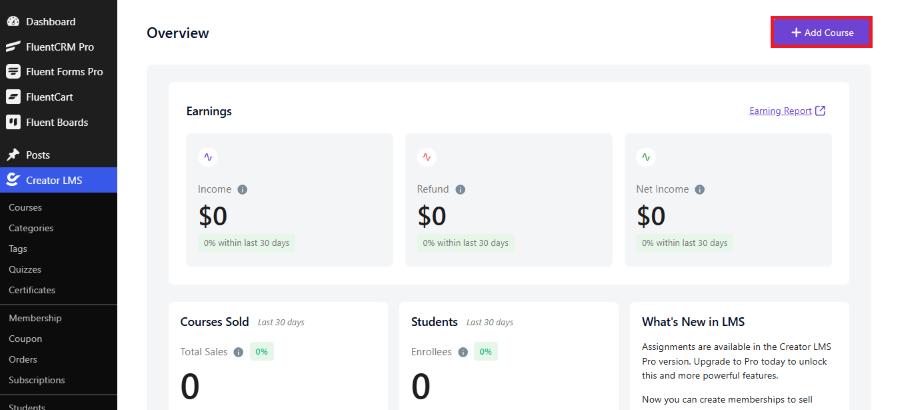
Log in to your WordPress dashboard. Navigate to Creator LMS in your sidebar and click Courses. Click the blue Add Course button at the top of the screen to open the unified, modern course creation interface.
Step 2: Navigate the Progress Stepper and Add Media
Look at the top of your screen. You will see a clean, horizontal progress stepper with three steps:
- Content
- Settings
- Preview By default, you start on the first step: Content. In the center of the screen, you will find the course media card. Use the buttons beneath this card to upload a course featured image, link an introductory video, or use the built-in AI visual assistant (the sparkles icon) to generate custom course graphics on the fly.
Step 3: Enter Your Course Title and Description
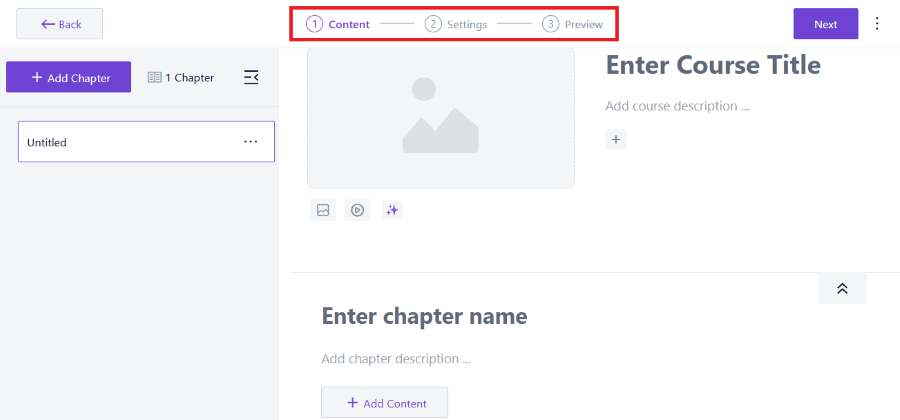
Next to your course media card, click directly on the Enter Course Title text box to type your main title. Right below it, click Add course description… to explain what your students will learn. You can use the block inserter icon (the plus symbol) to format your text or add extra details.
Step 4: Create Chapters on the Left Sidebar
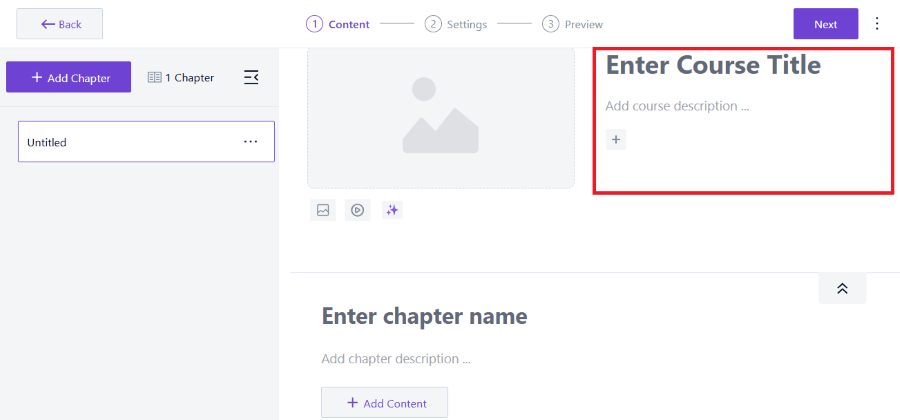
Look at the left-hand sidebar of your screen. Click the prominent purple + Add Chapter button to create your first learning module. An item labeled “Untitled” will appear in the left-hand chapter tree. You can click this purple button multiple times to build your entire course structure before writing any content.
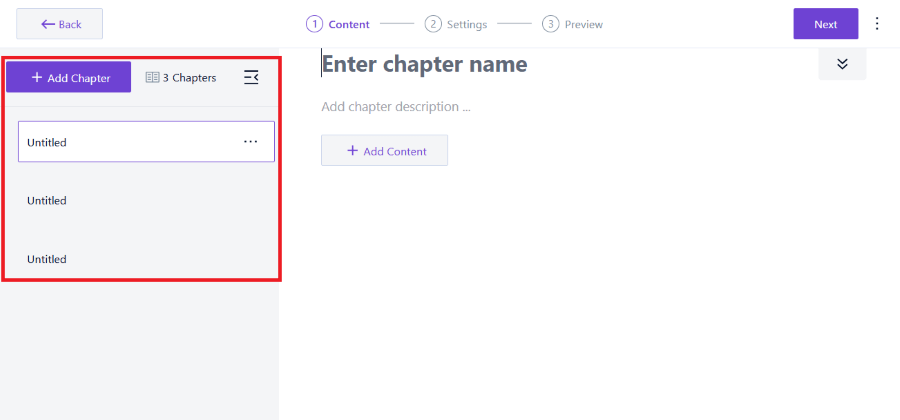
Step 5: Name and Describe Your Chapter
Click on your chapter in the left-hand sidebar list to open its details in the main workspace beneath the course title. Click on the large text area labeled Enter chapter name to give it a title, such as “Chapter 1: Getting Started.” Right below, use the Add chapter description… text field to write a brief overview of what this section covers.
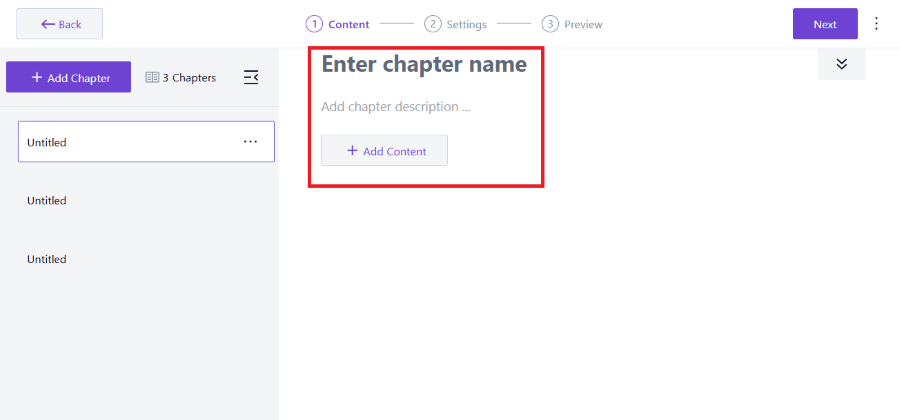
Step 6: Add Video, Audio, or Text Lessons
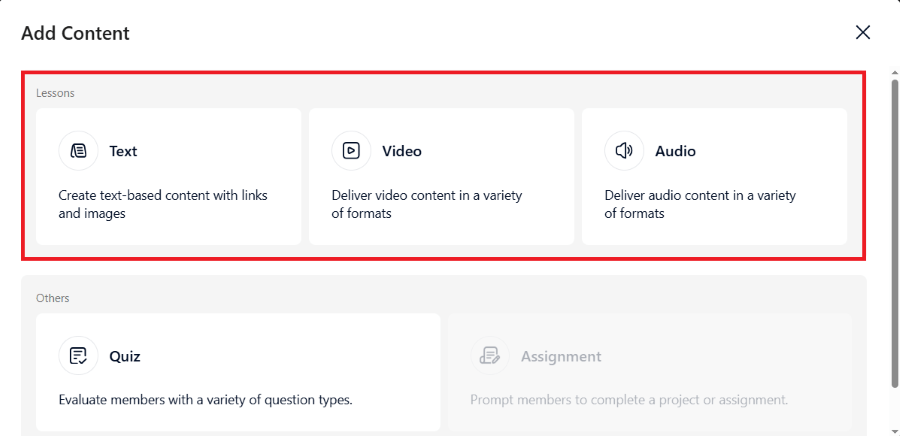
Underneath your chapter details, click the blue + Add Content button. A dropdown menu will present your lesson creation options:
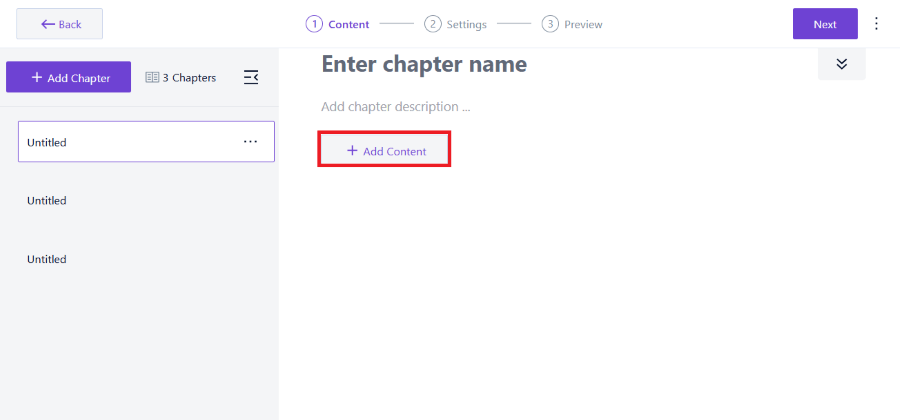
- Select Lesson to open the lesson builder panel.
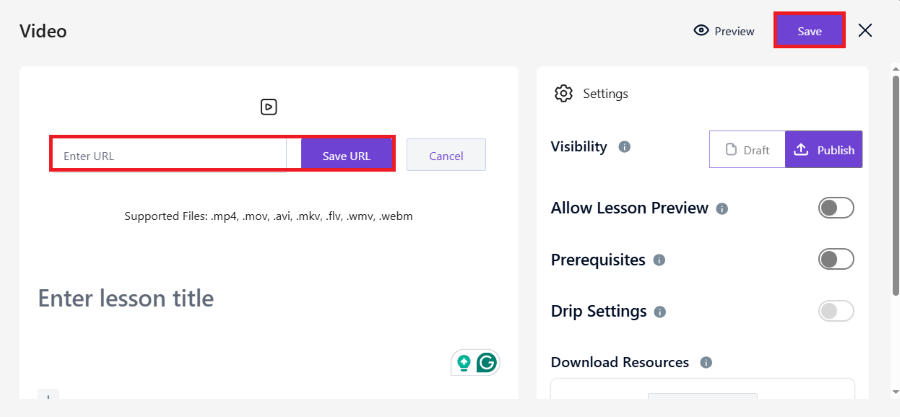
- Type your lesson title and select your content type: Video, Audio, or Text.
- If you select Video, choose your hosting source (like YouTube or Vimeo) and paste the URL. The custom, distraction-free player will format it automatically.
- Click save to return to the visual course outline screen.
Step 7: Build Your Practice Quizzes
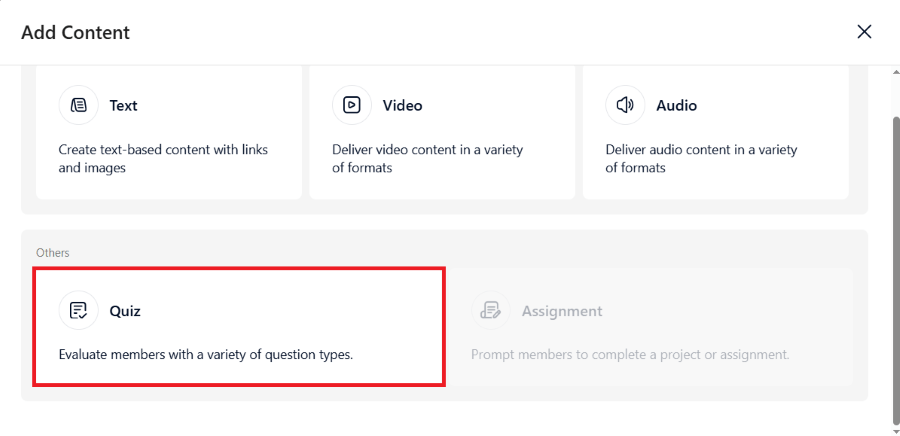
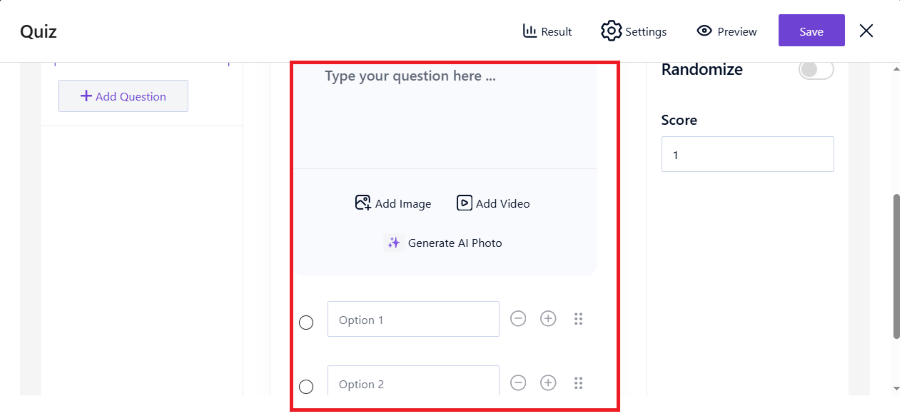
To test student retention, click the + Add Content button again and select Quiz to open the interactive question builder:
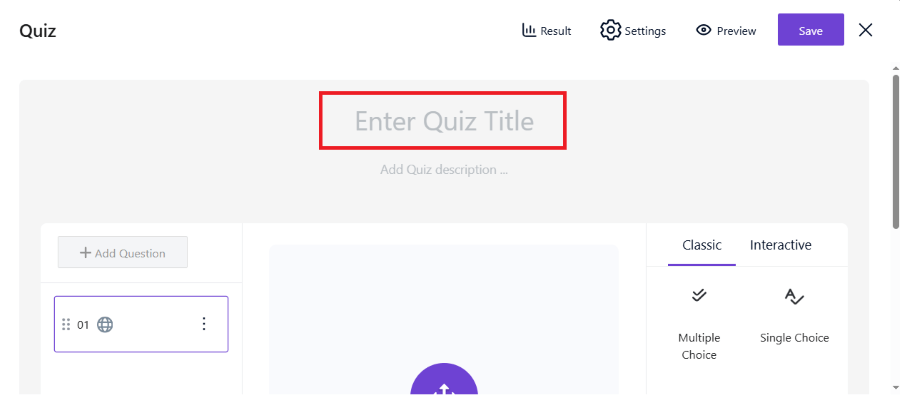
- Give your quiz a clear name, such as “Module 1 Assessment.”
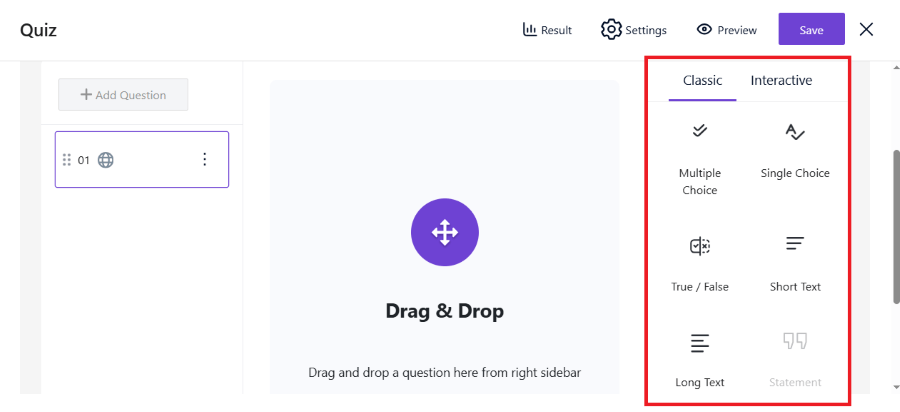
- Select from six included question types, such as Single Choice or True / False.
- Type your question and provide multiple-choice answers, marking the correct option by checking its corresponding circle.
- Set your custom passing grade percentage and click save.
Step 8: Configure Settings in Step Two
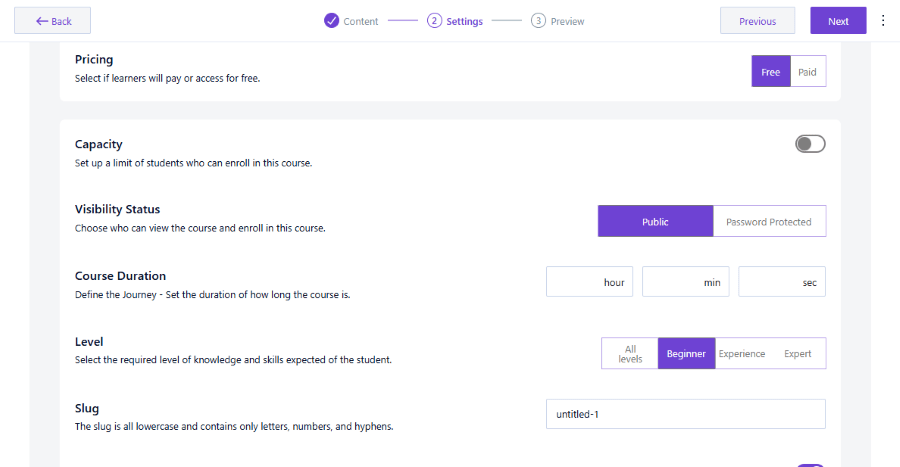
Once your content structure is complete, click the purple Next button in the top-right corner of your screen to move to the Settings phase (Step 2 on the header stepper). Here, you can configure:
- Pricing: Choose between Free or Paid to set up how learners will pay for or access your course material.
- Capacity: Toggle this switch on to set up a strict limit on the number of students who can enroll in this course. If left turned off, student enrollments remain unlimited.
- Visibility Status: Select Public to allow anyone to view and enroll in your course, or select Password Protected to restrict course access to only those students with your custom passkey.
- Course Duration: Define the learner’s journey by setting how long the overall course runs. You can input the total duration in custom hours, minutes, and seconds.
- Level: Define the level of knowledge and skill expected of your students. Choose between All levels, Beginner, Experience, or Expert.
- Slug: Edit your course URL identifier. Make sure your custom slug is formatted completely in lowercase and contains only letters, numbers, and hyphens.
Step 9: Preview and Publish Your Course
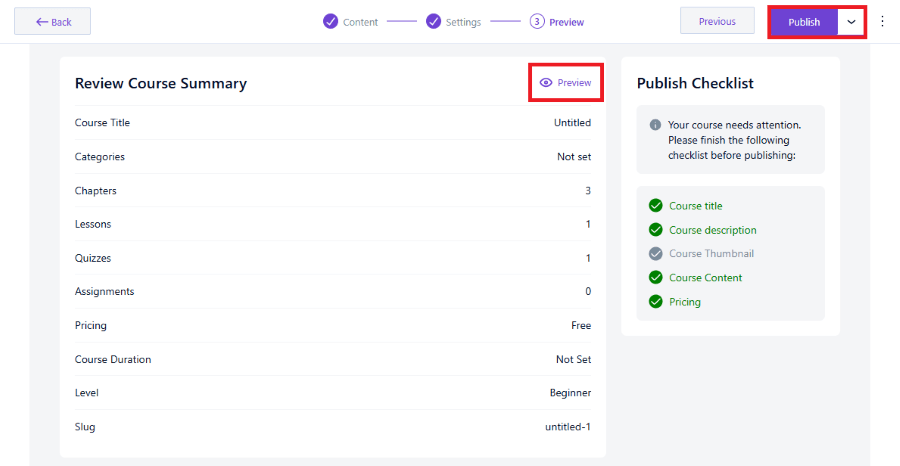
Click Next once more or click Preview (Step 3 on the header stepper) to review the final front-end look. Walk through the student view to verify the layout, video player compatibility, and navigation feel. If everything looks correct, click Publish in the top-right corner to make your interactive learning program live.
Creator LMS vs. The Competition
To make a smart purchase, you need to see how Creator LMS compares to other major WordPress course builders, specifically LearnDash and Tutor LMS.
| Feature | Creator LMS (Starter) | LearnDash (Base) | Tutor LMS (Pro) |
| Setup Process | Exceptionally Easy | Complex (Steep Curve) | Moderate |
| Dashboard Speed | Fast (Modern UI) | Average | Average |
| Native Stripe Checkout | Included (Free & Paid) | Requires Add-on | Requires WooCommerce |
| Built-In Community | Included (Pro Plan) | Requires BuddyBoss | Requires BuddyPress |
| Native Gamification | Included (Starter Plan) | Requires GamiPress | Requires GamiPress |
| Email Automation | Built-in (Mail Mint) | Requires Uncanny Automator | Requires AutomatorWP |
| Sales Funnels | Built-in (WPFunnels) | Requires Third-Party | Requires Third-Party |
| Base Price (1 Site) | $139.99/year | $259/year | $199/year |
Why Creator LMS Outperforms Legacy WordPress LMS Plugins
- No Hidden Plugin Costs: Traditional plugins require you to purchase third-party add-ons to unlock basic marketing features. For example, setting up a student community with LearnDash often requires buying BuddyBoss, which costs several hundred dollars per year. Creator LMS builds community features directly into its core code.
- No WooCommerce Dependency: Both LearnDash and Tutor LMS often force you to set up WooCommerce just to process simple card transactions. WooCommerce is a massive plugin that can slow down your hosting environment. Creator LMS uses a lightweight, direct Stripe gateway that processes payments quickly without external shopping cart code.
- Integrated Sales Architecture: Because Creator LMS is designed by the team behind WPFunnels and Mail Mint, it is the only WordPress LMS that connects natively with lead capture funnels, email marketing automations, and behavior-based email sequences right out of the box.
Creator LMS Pricing Plans
Creator LMS has a clear pricing structure. You can purchase annual subscription plans or opt for a rare lifetime license that allows you to avoid recurring software costs forever.
Get 20% OFF on Creator LMS
Annual Subscription Plans
If you prefer a lower upfront investment, the annual plans offer excellent value and include one full year of feature updates and developer support.
| License Type | Standard Annual Price | Domains | Key Features |
| Starter | $139.99/year | 1 Site | Unlimited courses, custom certificates, Stripe checkout, built-in gamification |
| Pro | $199.99/year | 5 Sites | All Starter features, AI content credits, automated emails via Mail Mint, cart recovery |
| Business | $399.99/year | 10 Sites | All Pro features, cohort courses, native community forums, sales funnels via WPFunnels |
| Agency | $599.99/year | 50 Sites | Designed for developers building professional client training sites |
The Free Version: Surprisingly Capable
If you are a beginner with a tight budget, the free version of Creator LMS is incredibly generous. Unlike competitor free trials that restrict your student count, Creator LMS Free includes:
- Unlimited courses, lessons, and students.
- Native Stripe and Mollie payment checkouts.
- A visual certificate builder with automated dynamic student fields.
- Six interactive quiz question types.
- Complete compatibility with major page builders like Elementor and Gutenberg.
You can easily launch your business using the free version, upgrading to the paid tiers only when you want to automate your marketing, add gamified rewards, or build social community spaces.
Pros and Cons of Creator LMS
No software platform is perfect. To give you a balanced overview, here are the primary strengths and weaknesses we discovered during our testing of Creator LMS.
The Pros
- Native Cart Experience: Processing student credit cards directly via Stripe without setting up complex ecommerce plugins is a massive time-saver.
- Lightweight Dashboard: The administrative panel feels incredibly modern, snappy, and intuitive, allowing you to build courses quickly.
- Gamification Included: Adding points, levels, and badges natively helps increase course completion rates without buying external integrations.
- Branded Video Player: Eliminates YouTube logo distractions and Vimeo watermarks, keeping your course content clean and professional.
The Cons
- Pro Plan Required for Email Automation: If you want to trigger automated behavior-based email sequences when a student completes a lesson, you will need the Pro plan to unlock the Mail Mint integration.
- Niche Gateway Integrations: While Stripe and Mollie are fully supported, creators in regions that rely on local regional payment gateways may need to wait for future development updates or utilize external webhook connections.
Who Should Buy Creator LMS?
Based on our thorough analysis of the plugin, Creator LMS is best suited for three specific types of online business owners.
The Expert Coach or Trainer
If you run high-ticket group coaching programs, you can use Creator LMS to replace Kajabi. By using the Business plan, you get cohort course scheduling, Zoom integration for live classes, and native community forums. This transition can save you thousands of dollars in software overhead:
The First-Time Course Creator
If you are launching your very first educational product, the free version of Creator LMS is perfect. It gives you a risk-free environment to design your course curriculum, upload your materials, and collect student payments without any monthly fees.
The Digital Agency Owner
For agencies building training websites for clients, the lifetime license options are highly valuable. You can build fast, custom-branded educational portals for your clients without worrying about managing multiple third-party add-on renewals or subscription price hikes.
Final Thoughts
Creator LMS is an exceptional tool that redefines how online courses are built and managed in WordPress. It successfully bridges the gap between expensive SaaS platforms that lock in your data and older WordPress plugins that rely on a messy web of external add-ons.
By prioritizing lightweight code, a visual drag-and-drop workflow, and native payment processing, Creator LMS respects both your website’s speed and your business budget. If you want to stop paying monthly platform rent, escape technical complexity, and build interactive, high-converting learning paths for your students, Creator LMS is an outstanding plugin that you should absolutely consider.