
Why Businesses Need an Interactive Cost Calculator
In today’s digital world, customers expect instant answers. Whether they’re requesting a quote for a renovation, a custom product, or a marketing package, waiting for manual pricing slows everything down.
Imagine a potential client landing on your website, interested in your services, but having to fill out a form and wait days for a quote. Many will leave before you even reply.
That’s the gap the Cost Calculator Builder plugin fills immediately. It transforms your website into an interactive experience, allowing users to calculate prices instantly based on their inputs without needing to contact you first.
As a result there are more transparency, engagement and higher conversation rates – the components to boost your business.
What is a Cost Calculator?
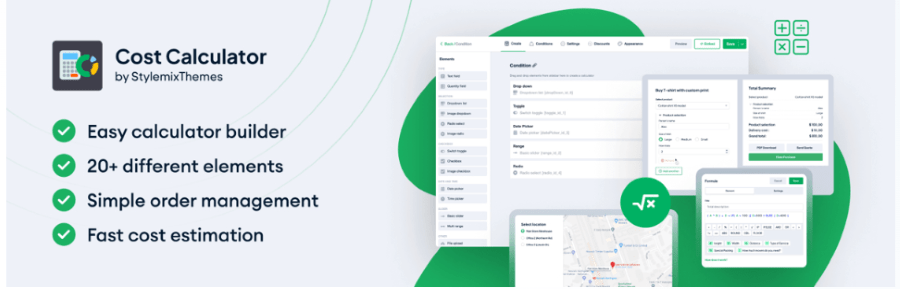
Cost Calculator Builder is a multifunctional WordPress plugin that lets you create interactive estimation forms without any coding knowledge.
It’s essentially a drag-and-drop visual cost calculator builder, designed to display real-time quotes for any product or service. You can embed calculators anywhere on your site pages, posts, sidebars, or product listings.
Based on your plans whether there are short-term or long-term, there are two versions of the Cost Calculator:
Key features of the Free version include:
- Unlimited forms (you can create multiple calculators).
- Visual drag-and-drop form builder (no code needed).
- Basic calculator elements (at least 10 elements) such as text fields, quantity fields, dropdowns, radio buttons, checkboxes, sliders, HTML, etc.
- Works with major page builders (compatibility with common WordPress builders).
- Easy customization of Cost Calculator. Use options such as color, font size, final overview, and much more to make your Calculator appealing for your users!
- Use the Formula element to build any formula for your Calculator. Create unique formulas for estimation.
In a nutshell, the Free version provides a solid base for creating cost-estimation forms suitable for many simple use cases, without advanced logic or integrations.
The Pro version of the Cost-Calculator is feature-rich and can undoubtedly improve your website. 20+ Premium Elements and Features are available in the Pro Version of the Plugin that will allow you to create any kind of calculator form, even logical calculators at a high level.
Some of the main additional features in the Pro version include
- Premium calculator templates (ready-made designs).
- Conditional logic / Conditional system (show/hide or enable/disable fields based on user input).
- Payment integrations: PayPal, Stripe, Razorpay, cash payments.
- WooCommerce integration — link calculator results to WooCommerce products, pricing, checkout.
- Date picker, Time picker, Multi-range slider, File upload, Image dropdown, Image checkbox & image radio elements.
- Orders dashboard – a dedicated admin interface within the plugin (accessible via WordPress Dashboard → Cost Calculator → Orders) gives you a complete log of all orders or quote submissions made through your calculator forms.
- Orders forms – a feature that allows users to create a form integrated with the calculator for collecting detailed customer information and streamlining the order process.
- PDF entries – generate, download, print or email a PDF version of a user’s calculation/quote/order form submission.
- Analytics – see how each calculator and field performs with views, submissions, and revenue stats in one place.
- Geolocation – capture and use the user’s physical location (or let them pick locations on a map) to calculate costs based on distance, branch selection, or pickup/drop-off points.
- Email templates and custom webhooks in Pro version.
- Additional layout/styling options: sticky calculator, several forms on one page, backup & restore, repeater element, discounts.
The Pro version thus elevates the plugin from a simple cost-estimator to a full lead-generation / commerce tool with integrations, automation and advanced field logic.
Who is the Cost Calculator best for?
The plugin is incredibly versatile and can serve a vast array of tasks, making it ideal for:
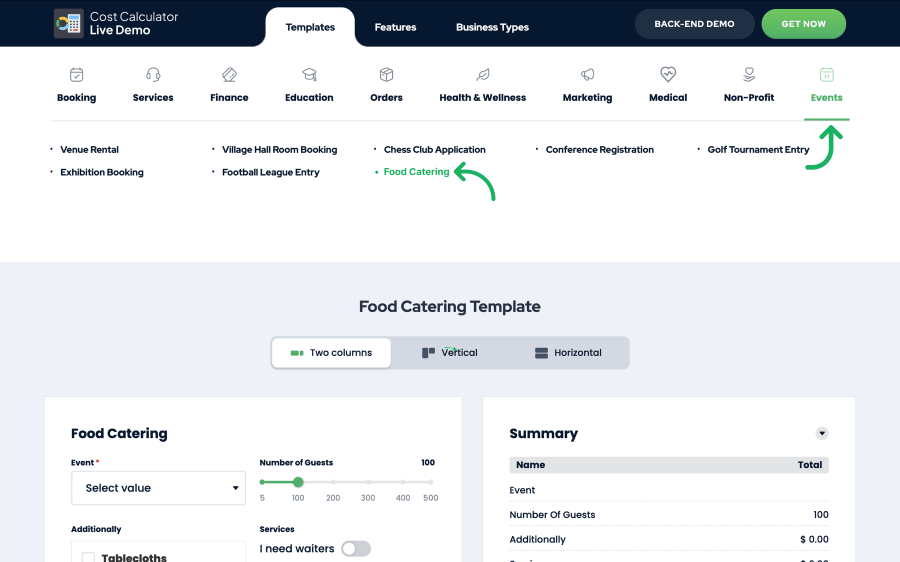
- Service-based businesses such as cleaning, repair, beauty salons, law firms, architecture, healthcare, or logistics. You can quickly design your own custom template from the ground up or simply choose one of the ready-to-use templates to get started instantly because the device has over 100 pre-built business-oriented booking forms and cost estimation calculators.
- Freelancers and agencies such as web designers, marketers, copywriters, and consultants who price projects dynamically. With Cost Calculator, clients can generate their own price estimates instantly by selecting services, quantities, or add-ons.
- E-commerce stores – The Cost Calculator Builder is ideal for e-commerce stores because it transforms complex pricing into interactive, transparent, and customizable estimates that boost customer trust, simplify product configuration, and increase conversions through seamless WooCommerce and payment integrations…
- Educational platforms – it allows institutions and course creators to offer clear, interactive pricing for courses, tuition plans, and learning packages, helping students estimate costs instantly while reducing administrative workload and improving enrollment conversions.
- Real estate and construction companies – it lets clients instantly estimate project or property costs by inputting variables like square footage, materials, services, or customization options, providing transparent pricing, faster lead generation, and a professional, interactive experience without the need for back-and-forth consultations.
How does the Cost Calculator work?
The Cost Calculator by Stylemixthemes is easy to use. You install it just like any other WordPress plugin. After activation, you’ll find a new “Cost Calculator” tab in your dashboard.
Then, you can create calculators visually:
- Add input fields – sliders, number boxes, dropdowns, toggles, checkboxes, date pickers, etc.
- Apply conditional logic – show or hide fields based on user selections.
- Set up custom formulas – define how values combine to form the final total.
- Style your calculator – choose colors, typography, and layout to match your branding.
- Settcurrency – Cost Calculator → Settings → Global Settings → Currency (Global).
- Set order form – Within a specific calculator, go to Calculator Settings → Order Form. Enable the Order Form (Pro feature) so after calculations users fill in contact/payment details.
- Set PDF Entries – Go to Cost Calculator → Settings → Global Settings → PDF Entries. Toggle “Activate PDF Entries” to enable the feature. A “Download PDF” button appears for users after submission.
- Display Calculator anywhere – via shortcode, block, or widget.
As a result you have a multifunctional Calculator that is easy and seamless in use!
Why Choose Cost Calculator Builder
- Instant Quotes for Faster Decision-Making
Enables users to receive immediate, real-time price estimates as they interact with your custom calculators. This dynamic functionality enhances user engagement and can significantly boost conversion rates by providing transparency and reducing friction in the decision-making process.
- User-Friendly Interface
Even non-technical users can build professional calculators in minutes. The drag-and-drop interface eliminates the need for coding or spreadsheets.
- Advanced Logic & Formula Options
It supports complex logic conditions, allowing you to create “smart” calculators that respond to user actions. For instance, you can show different price ranges based on service type, distance, or date selection.
- Built-in Lead Generation
Besides giving quotes, you can connect forms with email notifications or CRM tools. That means you can collect user data and follow up with personalized offers.
- PDF Entries
This feature is available in the pro version of the plugin. It allows customers to export the Total summary of calculations in a pdf document format. Send calculated quotes in PDF as an invoice; Receive PDF entries after completing the order on the confirmation page, on the same page as a calculator, or via email; Admin can access it in the Orders tab.
- Orders
Use a pro plugin feature that allows an administrator to track a detailed log of all calculator orders made by website users.
- Order Analytics
This pro plugin feature in Cost Calculator Builder provides customers with a clear picture of how calculators perform and how users interact with them. Track key metrics like revenue, total orders, views, and interactions, along with daily activity trends — all from a clean, visual dashboard. Create your own custom form. You also can get your profit according to these calculations.
- Multilingual & Mobile-Friendly
The plugin works with WPML and displays beautifully across devices. A responsive design ensures users can calculate on the go.
Use Cases
Let’s look at how different industries can apply Cost Calculator Builder:
Home Renovation & Construction
A renovation or construction company can use the Cost Calculator to create a fully interactive quote builder. Clients can select variables such as room type (kitchen, bathroom, living room), square footage, flooring material, wall finishes, lighting, and additional features like custom cabinetry or smart home installations. The calculator instantly updates the estimated cost, helping clients visualize the total project budget before even contacting the company. This reduces unnecessary calls and ensures that leads coming in are pre-qualified and serious.
Beauty & Wellness
Salons, spas, and wellness centers can offer interactive packages that include basic, premium, and deluxe services, with the ability to add extras such as manicures, pedicures, hair treatments, facials, massage sessions, or spa add-ons. The calculator instantly updates totals as clients make their selections, allowing them to personalize their wellness experience while seeing how each add-on affects the price. This enhances transparency, encourages upselling, and reduces appointment scheduling confusion.
Cleaning service
The Cost Calculator Builder plugin is a powerful tool for cleaning service businesses, allowing customers to instantly calculate the cost of their cleaning based on custom options. You can easily create a calculator with fields for property type, cleaning area size, type of cleaning (standard, deep, move-in/out), frequency, number of rooms, and add-on services like window or carpet cleaning. The plugin automatically applies your pricing formulas. For example, a base rate per square foot plus extra fees for deep cleaning or urgent bookings, giving users a transparent, real-time estimate. Once built, simply embed the calculator on your booking or pricing page to turn your site into an interactive, lead-generating tool that makes pricing fast, accurate, and engaging for customers.
Plugin Installation
Cost Calculator Builder WordPress plugin has two types, basic free, and pro versions. According to the version of it, the installation process will differ.
Basic free version installation
As it is a WordPress plugin, you can install it in two ways following:
In the first way, download the plugin archive file in the WordPress repository.
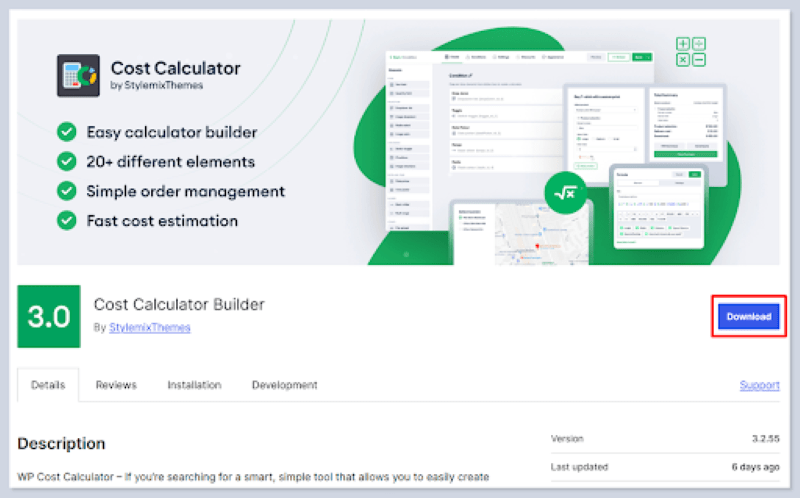
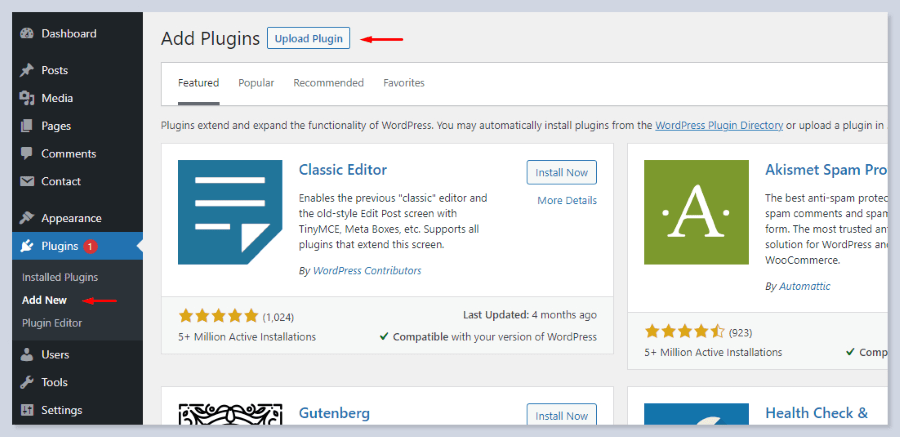
Follow to Plugins > Add New from your dashboard.
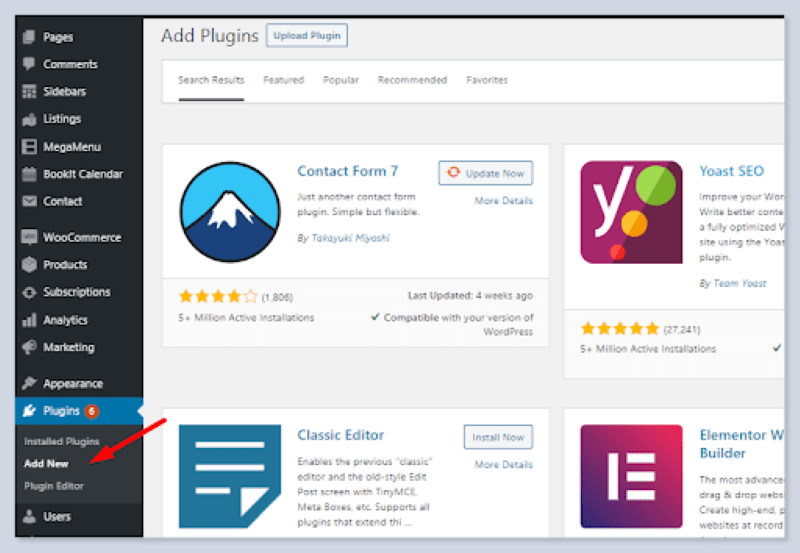
Click on the Upload Plugin button and select the Cost Calculator Builder downloaded file from your local folders. Click Install Now and wait for the installation to finish.

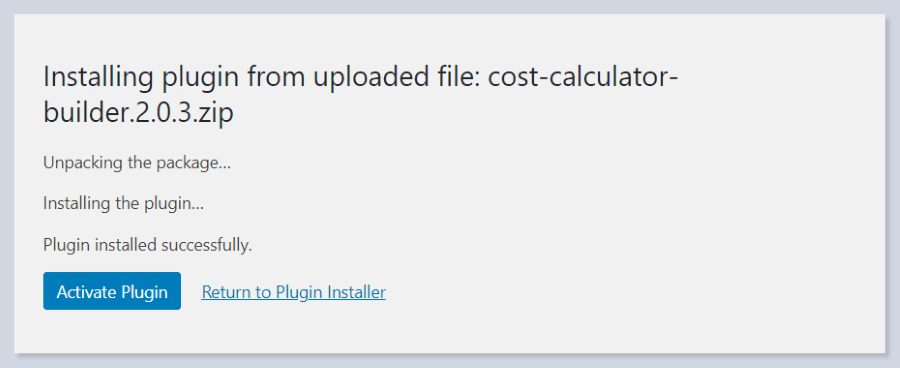
After installing it successfully, you need to activate the plugin.
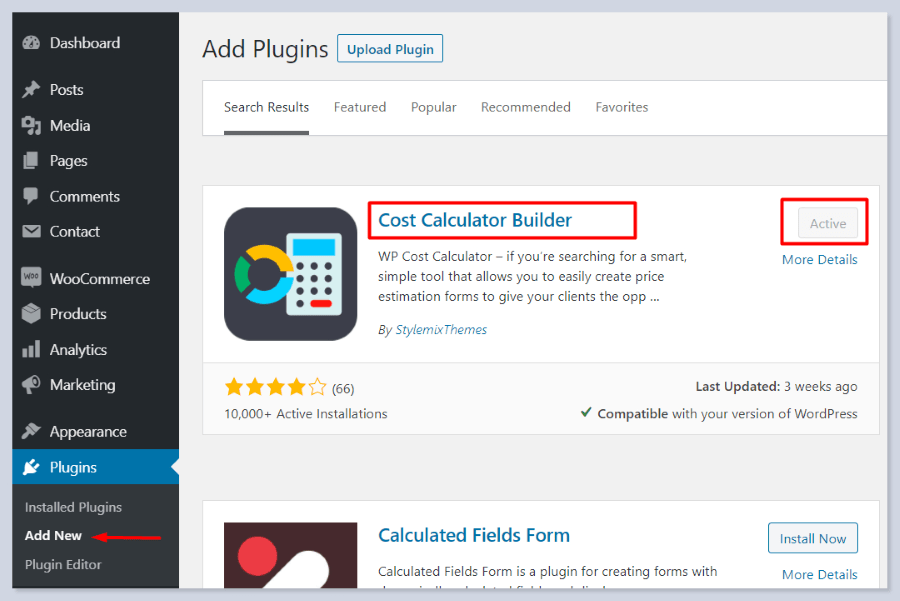
The second way of installation can be done directly in your WordPress Dashboard.
Go to Plugins > Add New from your dashboard and give the desired search.
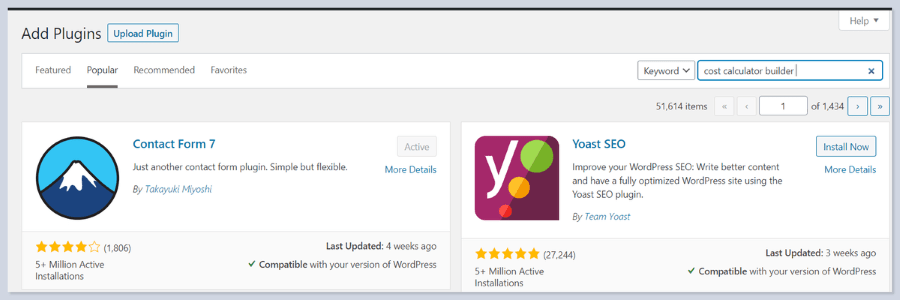
From the results of the search box, install the plugin. After clicking the Install button, the Activate button will appear. Click it for activation.
If you open the Calculator you will get this welcoming page that highlights the plugin’s key features and useful links to docs, video tutorials, support, etc:

For a more detailed step-by-step tutorial of the Cost Calculator Builder, Pro Version and its features follow our documentation: Cost Calculator Builder Documentation | StylemixThemes Docs
Conclusion
Cost Calculator Builder by StylemixThemes is one of the most practical WordPress tools for businesses that rely on dynamic or customized pricing.
It combines simplicity, flexibility, and power, helping you turn static service pages into interactive, conversion-optimized experiences.
If you want to offer instant quotes, make pricing transparent, and reduce customer hesitation, this plugin is one of the best solutions on the WordPress market.
It’s not just a pricing tool, it’s an engagement engine that makes your website more interactive, informative, and customer-focused.