
What is Motors Plugin?
Motors is a premium, all-in-one WordPress plugin by StylemixThemes built to drive success for automotive businesses, dealerships, and classified-listing platforms.
Whether you’re selling cars or managing a large inventory of boats, bikes, or heavy equipment, Motors turns your ordinary WordPress site into a fully functional, dynamic platform for showcasing your car dealerships.
With Motors, you can create an elegant, professional platform that handles everything from vehicle listings and inventory management, search filters, and all to create a website with a stunning design.
Who is it for?
Designed for businesses and individuals to manage or promote vehicles online, such as car dealerships or multi-dealer platforms. It’s ideal for anyone who wants to create a structured, searchable catalog of vehicles on a WordPress website, including listings for cars, motorcycles, boats, or trucks.
You need this plugin because it provides all the essential tools to display, organize, and manage vehicle inventories professionally without custom coding.
In a nutshell, it’s the go-to solution for turning a WordPress site into a polished, user-friendly platform for showcasing and selling vehicles.
Why choose Motors Plugin?
For business owners looking to build or scale a vehicle-listing website (dealership, classifieds, equipment resale), Motors offers a compelling package to boost their business and make maximum profit!
- Industry-specific design and functionality
This is not a generic listings tool. It’s built specifically for vehicles and related assets (cars, motorcycles, boats, equipment). Basically the device is tailored for adding an unlimited number of custom fields and to create search filters based on those fields. Motors is an easy solution for business owners that want to benefit because they don’t need to hack a generic plugin, the workflow aligns with their business right out of the box.
- All-in-one inventory management
This feature gives you full control over your inventory. From a single, intuitive dashboard, you can effortlessly create, edit, and delete listings, customize and manage an unlimited number of custom fields, and configure detailed search filters.
- Advanced search filters
Help your customers find exactly what they need. With the car dealer plugin, you can use custom filters to make searches more precise. Make it easier for buyers to discover the right cars quickly, encouraging faster decisions. Advanced filtering shows visitors only the vehicles that match their preferences, resulting in more inquiries and higher sales.
- Professional presentation + UX
New Inventory Skins – help your users quickly discover the perfect vehicle with personalized filters, so they spend less time browsing and more time buying.
Listing Card Skins – let each listing speak for itself. With this feature you can showcase important details so buyers can quickly compare options and make confident choices. Choose between multiple option, such as Elegant, Compact, Luxury, Classic, Modern skins.
Ready-Made Listing Templates – pick a ready-made template or build your own with Elementor to present your listings. Thus you can launch professional listing pages quickly while still keeping full control of your site’s design and branding.
- Flexibility for different business models
The plugin is ideal not only for car dealerships but also for yacht and boat showrooms, motorcycle dealerships, agricultural machinery sellers, trailer retailers, and any other business that manages and sells vehicle or equipment listings online.
Key Features:
Filter Keyword Search – Let users type terms like “Ford,” “hybrid,” or “leather seats” and instantly view matching cars. It saves time and makes searching feel as natural as using Google.
Filter by location – Let buyers search by city, region, or ZIP code so they can quickly find cars near them instead of scrolling through distant listings.
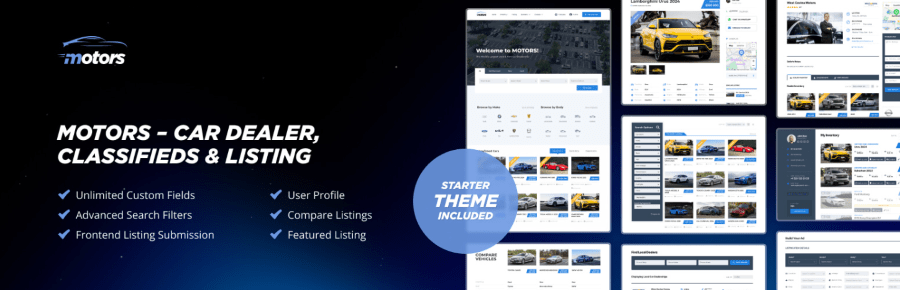
Unlimited Custom Fields – Every business is unique. Add unlimited custom fields: mileage, color, fuel type, or more, to tailor your listings to your exact needs.
6 Field Types – Offer flexible search options with dropdowns, sliders, toggles, checkboxes, ranges, and text fields for a smooth user experience.
All-in-One Listing Manager – Manage everything from a single dashboard, edit listings, publish new cars, mark vehicles as sold, or remove old ads in just a few clicks.
Listing Card Skins – Showcase your cars with stylish card designs to grab attention, keep visitors engaged, and boost lead generation.
Listing Templates – Save time with ready-made templates that keep your site clean, consistent, and hassle-free.
Frontend Listing Submission Form – Let your users or dealers add new cars directly from the website without needing access to the admin panel, which is easier and safer.
Email Templates Manager – Send professional emails effortlessly using customizable templates for sign-ups, bookings, or inquiries.
Car Info Autocomplete – Auto-fill vehicle details by make, model, year, or VIN to speed up listings and ensure accuracy.
Prebuilt Website Skins – Launch your site quickly with ready-to-use, beautifully designed skins, no coding or design skills required.
Whatsapp Integration – Connect with buyers instantly, let visitors start a WhatsApp chat from your listings or dealer page with just one click.
Loan Calculator – Help buyers plan better by letting them calculate monthly payments and total loan costs directly on the listing page. This keeps them engaged and closer to purchase.
Listing Comparison – Make it simple for users to compare cars via letting them see prices, features, and specifications side by side, making decision-making easier and faster.
SEO-Friendly URL – Your site will show up better on Google with clean and simple URLs. More visibility means more visitors and more leads.
Image Sliding on Hover – Visitors can preview multiple images without opening each listing, just hover over a car card to see different angles and details instantly.
Sold Status for Listings – Mark cars as “Sold” to keep your site accurate and build trust with visitors.This builds trust with visitors and keeps your website accurate and up to date.
Saved Searches – Users can save their favorite filters like “SUV under $20k.” They’ll get alerts when new cars match their search, bringing them back to your site again and again.
Multiple Currencies – Show prices in the local currency of each visitor. Suitable for international buyers and sellers, making your site user-friendly to a global audience.
Login/Registration Form – Make sign-ups quick and simple. Users can register or log in directly from the website without extra steps and save time.
Email Confirmation – Protect your site from fake accounts with one-click email verification for new users.
Dealer & Manager Roles – Give your team different access levels. Dealers can manage their own cars, managers can update listings, and you stay in full control without sharing admin rights.
Dealer Profile Page – Display dealer info, contact details, and active listings on a single page to build trust and simplify buyer connections.
Google Maps Integration – Display your cars on Google Maps, letting users easily browse and find nearby vehicles.
Google Recaptcha Integration – Protect your forms from spam and bots. Visitors won’t notice it, but your site stays secure.
Paid Featured Listing – Feature special cars at the top of your catalog. Dealers pay to boost listings, helping you earn more while giving them extra visibility.
Pay Per Submit – Collect a small one-time fee for each new listing submitted – a simple way to monetize your site without subscriptions.
Social Login – Allow users to log in with Google or Facebook in a single click, no extra passwords required.
VIN Decoder – Automatically fill in car details from the VIN, including specs, manufacturer, and production year, to save time.
Use Case:
Wonder how businesses boost their profit with Motors? Here’s an example:
Imagine you run a local car dealership (or used‑car lot) and you want to build a clean, professional website to showcase your inventory. You want to: list cars, allow potential buyers to browse/filter, and mark sold vehicles, but you don’t need complicated multi‑seller infrastructure.
Motors Plugin comes in handy here!
- Install Motors (free or Pro, depending on features you need). Use the setup wizard to build custom fields relevant to your dealership: mileage, fuel type, transmission, color, year, condition, etc.
- Use a pre-built listing template (or build a simple one with Elementor) to display vehicles in a modern grid or list.
- Add search filters so visitors can filter by price range, make/model, year, mileage, fuel type, etc. Optionally enable location filter (city/ZIP) if you serve a larger region. Every time you add a new car, optionally use the VIN / Make‑Model/Year autocomplete addon to quickly fill in standard specs and ensure data consistency.
- When a car sells, mark it as “Sold” to remove it from active inventory but still show as sold (optional), helps maintain accurate listings and trust with visitors.
Why does this work and why is it worth it?
- Quick setup with minimal technical skills (thanks to templates + page builder support).
- A clean, professional online inventory helps build credibility and attract buyers.
- Advanced filters give users a smooth experience, they can find exactly what you want.
- Auto‑filling specs saves time and reduces errors, especially for larger inventories.
- Marking sold cars keeps inventory accurate and avoids confusion or frustration for buyers.
Let’s take an example to see Motors Plugin in action. A small used‑car lot in Billings sets up its website using Motors. A visitor filters by “SUV, under $25,000, mileage under 100k, automatic transmission”, sees 5 matching cars, picks one, and contacts the dealer directly. After sale, the dealer marks it “Sold”, and it no longer appears in active listings. The deal goes smoothly and quickly for all parties interested.
How to install Motors Plugin?
There are two ways you can install Motors Plugin.
Method 1: Installing via the WordPress Repository
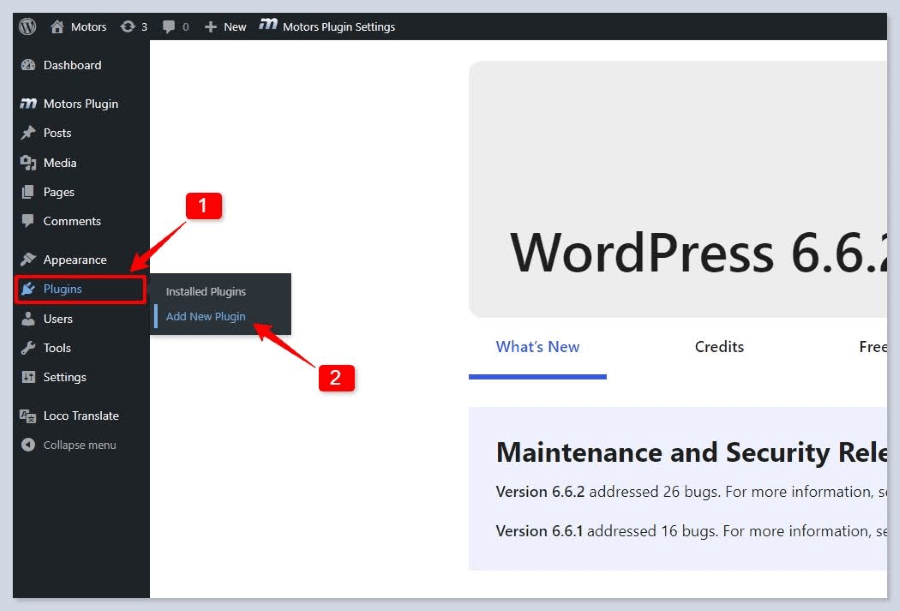
- Go to your WordPress Dashboard and select Plugins > Add New.
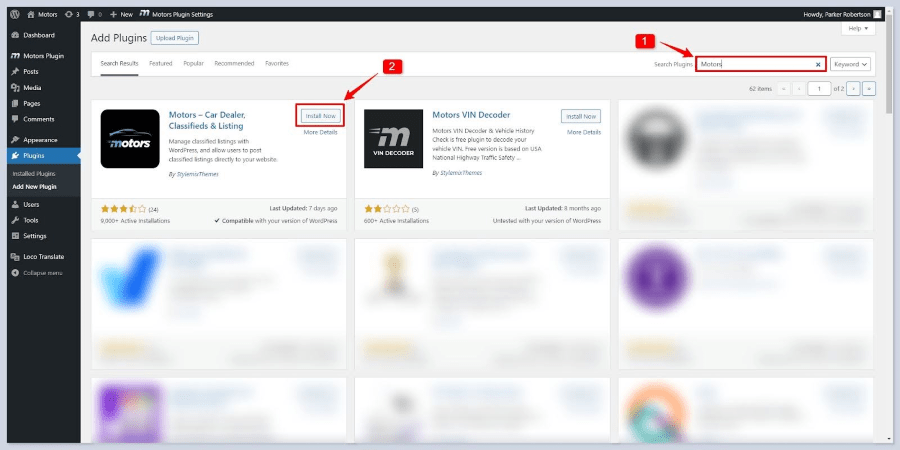
- Search for the Motors Plugin.
- In the search bar, type Motors and press Enter.
- Install and Activate the Plugin.
- Locate the Motors plugin in the search results.
- Click the Install Now button and wait for the installation to complete.
- Once installed, click the Activate button.
Method 2: Installing via Plugin Upload
Download the Plugin.
Download the Motors plugin zip file from the WordPress.org repository or another trusted source to your local computer.
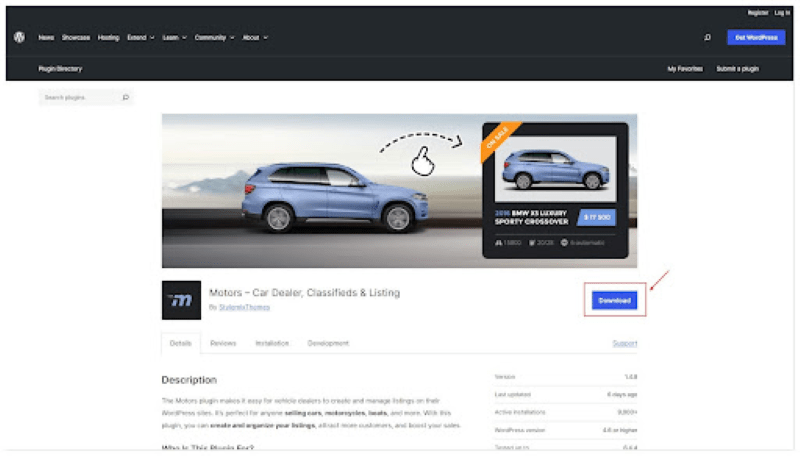
Navigate to the Plugins Section.
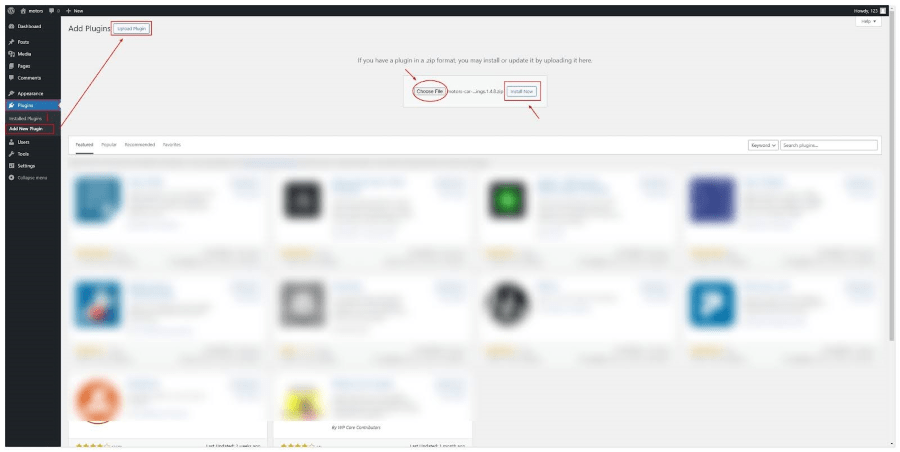
Go to your WordPress Dashboard and select Plugins > Add New.
Upload the Plugin.
Click the Upload Plugin button at the top of the page.
Choose the Motors plugin zip file from your local folders.
Click the Install Now button and wait for the installation to finish.
Activate the Plugin.
Once the installation is complete, click the Activate button.
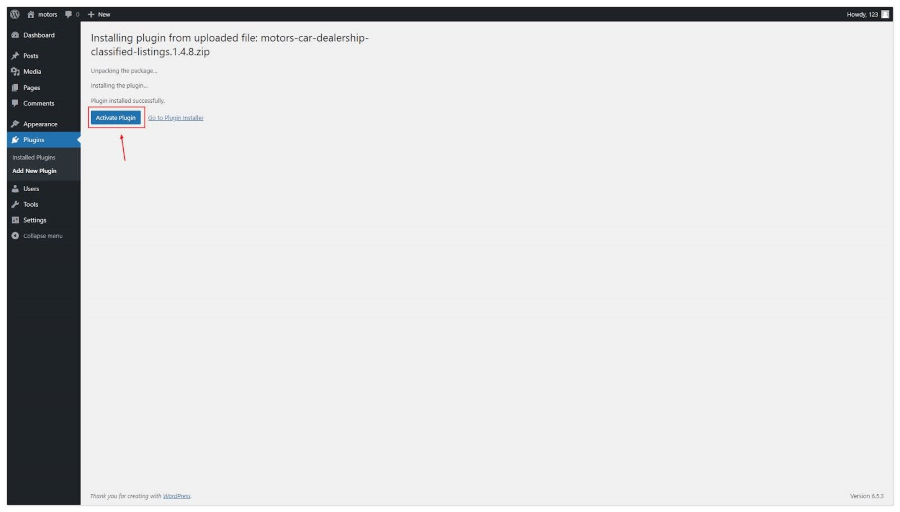
These steps ensure the Motors plugin is correctly installed and activated on your
WordPress site.
For a more detailed and comprehensive manual on Motors Plugin, check out Documentation.
Final Thought
The Motors plugin makes building a vehicle listing website easier, smarter, and far more effective. It gives you the tools to showcase your inventory the way you want, helps shoppers quickly find the right car, and lets you manage dealers or listings without any hassle. You can customize everything, add powerful search filters, and even monetize your site with paid listings or featured ads. Whether you’re a small dealership, a growing marketplace, or working with specialty vehicles, Motors gives you the flexibility and professional features you need to stand out and turn visitors into real buyers.